Mastering the art of visual storytelling through storyboarding is crucial for any filmmaker, animator, or creative professional. A compelling storyboard isn’t just a series of drawings; it’s a blueprint for a captivating narrative, a visual roadmap guiding your project from concept to completion. This guide delves into nine proven techniques to elevate your storyboarding skills, transforming your static images into dynamic scenes that resonate with your audience.
From understanding fundamental visual storytelling principles to mastering advanced techniques like dynamic camera angles and expressive lighting, we’ll explore the practical steps involved in creating professional-quality storyboards. We’ll also examine various software options and discuss best practices for creating clear, concise, and impactful visual narratives.
Visual Storytelling Fundamentals

Effective visual storytelling in a storyboard hinges on conveying a narrative arc, establishing mood, and engaging the viewer through compelling visuals alone. It’s about showing, not telling, and using the visual language of composition, character design, and setting to communicate the story’s essence. A well-crafted storyboard transcends a simple sequence of images; it becomes a blueprint for a powerful and emotionally resonant experience.
Creating a Compelling Narrative Arc with Visual Elements
A compelling narrative arc, even in a storyboard, requires a clear understanding of structure. This typically involves establishing an inciting incident, building tension through rising action, reaching a climax, and resolving the conflict through falling action and a resolution. Visually, this might be shown through a progression of panels: a peaceful opening scene disrupted by a sudden event, escalating conflict shown through increasingly dynamic compositions and character expressions, a climactic panel brimming with action and emotion, and finally, a quieter, more resolved image reflecting the story’s outcome. The use of color, lighting, and camera angles can also significantly enhance the emotional impact of each stage. For example, a shift from warm, inviting colors to cold, stark tones can visually represent a character’s emotional journey.
Designing Visually Engaging Characters and Settings
Character design should be expressive and memorable. Consider the character’s personality, role in the story, and emotional state. Are they heroic, villainous, or somewhere in between? Visual cues such as posture, clothing, and facial expressions should instantly communicate these traits. Similarly, settings should be detailed enough to establish the story’s tone and atmosphere. A dark, shadowy alley suggests danger, while a bright, sunlit meadow evokes a sense of peace. The level of detail will vary depending on the style of the storyboard, but consistency is key. Think about how a character’s silhouette against a specific background can create immediate visual interest and convey information about the scene. For example, a lone figure silhouetted against a stormy sky instantly suggests isolation and vulnerability.
Examples of Successful Storyboard Panels and Their Impact
Consider a panel depicting a character staring intensely at a distant object. The character’s focused gaze, coupled with a shallow depth of field blurring the background, immediately draws the viewer’s eye to the object, creating intrigue and anticipation. Or imagine a wide shot showing a character dwarfed by a towering building; this immediately conveys a sense of the character’s vulnerability and the imposing nature of their surroundings. In contrast, a close-up shot of a character’s tear-streaked face can powerfully communicate intense emotion. The strategic use of panel size and composition significantly impacts the viewer’s emotional response.
Comparison of Storyboard Styles
| Style | Description | Strengths | Weaknesses |
|---|---|---|---|
| Film Storyboard | Detailed sketches focusing on camera angles, lighting, and actor placement. Often includes detailed notes. | Precise visual communication, excellent for live-action planning. | Time-consuming, requires strong drawing skills. |
| Animation Storyboard | More stylistic and expressive, often employing simplified character designs and backgrounds. | Faster to create, allows for greater flexibility in animation styles. | May lack the detail necessary for complex live-action scenes. |
| Comic Storyboard | Similar to animation but often with a more graphic novel aesthetic, incorporating speech bubbles and sound effects. | Highly versatile, can be easily adapted to different media. | Can be less precise in conveying camera angles and lighting. |
| Video Game Storyboard | Often incorporates UI elements and gameplay mechanics, focusing on player interaction and perspective. | Directly addresses gameplay design and user experience. | Can be highly specialized and require specific technical knowledge. |
Crafting Compelling Scenes
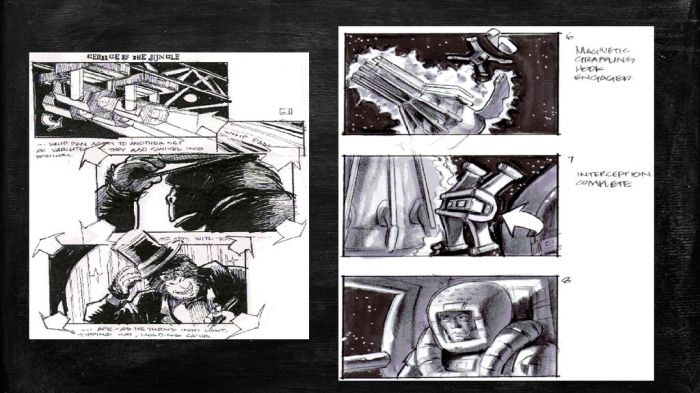
A compelling storyboard scene goes beyond simply depicting action; it evokes emotion, builds tension, and advances the narrative through visual language. Effective scene design relies on a masterful interplay of camera angles, lighting, color, movement, and the subtle art of conveying both spoken and unspoken communication. This section will explore techniques to craft scenes that are not only visually appealing but also powerfully communicative.
Dynamic Camera Angles
Camera angles significantly impact the viewer’s perception of a scene and its characters. A low angle shot, for instance, can make a character appear powerful and imposing, while a high angle shot can portray vulnerability or insignificance. A Dutch angle (tilted camera) introduces unease or disorientation. Consider the character’s emotional state and their relationship to the environment when selecting camera angles. For example, a character feeling trapped might be shown from a confined, low angle, whereas a character experiencing triumph might be filmed from a dynamic, sweeping low angle. The careful selection of camera perspective contributes greatly to the overall impact of a scene.
Lighting and Color to Enhance Mood
Lighting is crucial in setting the tone and atmosphere. High-key lighting (bright, even illumination) often suggests happiness or optimism, while low-key lighting (strong contrasts between light and shadow) can create suspense or mystery. Color also plays a vital role; warm colors like reds and oranges evoke passion or anger, while cool colors like blues and greens can suggest calmness or sadness. Consider the symbolic associations of colors when making your choices. For example, a character experiencing grief might be bathed in desaturated blues, while a scene of intense action could utilize vibrant reds and oranges to highlight the energy. The strategic use of light and shadow, and color palettes, can significantly enhance the emotional impact of your storyboards.
Depicting Movement and Action
Even in a static image, movement can be effectively conveyed. Techniques include motion blur (suggesting speed), overlapping action (showing a sequence of events), and the use of dynamic lines and composition to imply direction and energy. For example, to show a character running, you might use blurred lines to represent their legs and a slightly tilted figure to convey speed and momentum. Clever use of visual cues can convincingly suggest movement without relying on multiple panels.
Visualizing Dialogue and Internal Thoughts
Visualizing dialogue can be achieved through speech bubbles, thought bubbles, or even through the characters’ expressions and body language. Internal thoughts can be represented through visual metaphors, symbolic imagery, or close-ups on the character’s face to show their internal struggle. For example, a character’s internal conflict might be shown through contrasting images or symbols within a single panel. The key is to find visual representations that communicate the essence of the dialogue or thought without explicitly stating it.
Storyboard Panels: Varying Tension Levels
Below are descriptions of three storyboard panels depicting a single scene – a character discovering a hidden room – with escalating tension levels.
Panel 1 (Low Tension): The panel shows a character, silhouetted against a dimly lit hallway, discovering a slightly ajar door. The door is a simple wooden door, slightly out of place in the otherwise pristine hallway. The character’s expression is one of mild curiosity, not alarm. The overall color palette is muted and calm.
Panel 2 (Medium Tension): The character has opened the door slightly, revealing a dark, shadowy room. A single beam of light from a crack in the wall illuminates dust motes floating in the air. The character’s posture is now more tense; their hand is reaching for something to defend themselves. The color palette is darker, with deep blues and shadows dominating the scene.
Panel 3 (High Tension): The character is fully inside the room, illuminated by a flickering candle. A menacing figure is partially visible in the deepest shadows of the room, their eyes gleaming. The character’s expression is one of stark fear, and their body is frozen in place. The color palette is dominated by deep reds and blacks, enhancing the feeling of dread.
Storyboarding Techniques and Best Practices
Effective storyboarding is crucial for visualizing a narrative and ensuring a cohesive final product, whether it’s a film, animation, or interactive experience. A well-constructed storyboard serves as a blueprint, guiding the creative team through the visual storytelling process and facilitating clear communication. Understanding key techniques and best practices can significantly improve the clarity and efficiency of your storyboarding workflow.
Creating a compelling storyboard involves more than simply sketching out images; it requires a strategic approach to visual communication. This section will explore the essential elements of effective storyboarding, detailing the process from script to final storyboard, and examining different software options available to streamline the process.
Key Elements of an Understandable Storyboard
A clear and easily understood storyboard prioritizes visual clarity and concise information. Key elements include consistent panel sizing and layout, clear visual descriptions accompanying each panel (often using concise text or s), and a consistent visual style. Using established cinematic techniques such as shot type notation (e.g., CU for close-up, LS for long shot) further enhances understanding. The overall flow of the storyboard should be logical and easy to follow, mirroring the narrative progression. Finally, a clear indication of scene changes and transitions is essential for maintaining coherence.
Creating a Storyboard from a Script
The process of creating a storyboard from a script typically begins with a thorough script reading to fully grasp the narrative and its visual potential. Next, the script is broken down into individual scenes, each further divided into key moments or actions suitable for individual storyboard panels. For each panel, the shot type, camera angle, character actions, and significant visual details are determined. These elements are then sketched or digitally rendered, accompanied by concise descriptions to clarify any ambiguities. Regular review and refinement are vital throughout the process to ensure accuracy and consistency.
Step-by-Step Guide to Professional Storyboarding
- Script Analysis: Thoroughly read and analyze the script, identifying key scenes, actions, and emotional beats.
- Panel Layout: Plan the number and arrangement of panels to effectively represent the narrative flow. Consider using thumbnail sketches to experiment with different layouts.
- Visual Description: For each panel, create a concise visual description including shot type, camera angle, character positioning, and key actions.
- Sketching/Digital Rendering: Sketch or digitally render each panel, focusing on clarity and consistency. Maintain a consistent visual style throughout the storyboard.
- Dialogue/Sound Effects: Include dialogue and sound effects where appropriate, using concise notation.
- Review and Refinement: Review the completed storyboard for clarity, consistency, and narrative coherence. Make necessary revisions.
- Finalization: Once satisfied, finalize the storyboard, ensuring it’s ready for presentation or production.
Comparison of Storyboarding Software
Several software options cater to storyboarding needs, each with its own strengths and weaknesses. Storyboard Pro offers robust features and a professional workflow, while simpler options like Photoshop or even PowerPoint can suffice for less complex projects. Software choices often depend on budget, technical expertise, and the project’s scale. Consider factors like ease of use, collaboration features, and export options when making your selection.
Example Storyboard: Short Scene
This storyboard depicts a short scene where a character, ANNA, discovers a lost kitten.
| Panel | Visual Description | Purpose |
|---|---|---|
| 1 | Wide shot of a park, showing lush greenery and a pathway. Slightly overcast day. | Establishes setting and mood. |
| 2 | Medium shot of Anna walking along the pathway, looking down. Slightly worried expression. | Introduces the protagonist and hints at her emotional state. |
| 3 | Close-up on a small, fluffy kitten hiding under a bush. | Introduces the kitten and creates intrigue. |
| 4 | Anna’s POV (point-of-view shot) as she spots the kitten. Expression changes to surprise and concern. | Shows Anna’s reaction and emphasizes the kitten’s vulnerability. |
| 5 | Medium shot of Anna gently approaching the kitten, extending her hand. | Highlights Anna’s compassionate nature and builds anticipation. |
| 6 | Close-up of Anna’s hand as the kitten cautiously approaches and nuzzles her fingers. | Creates a moment of connection and emotional impact. |
Closing Notes
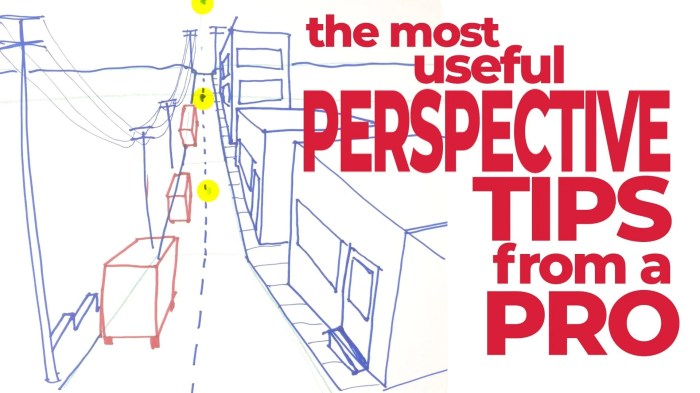
By implementing these nine pro tips, you’ll be well-equipped to craft storyboards that not only communicate your vision effectively but also inspire and engage your collaborators. Remember, a strong storyboard isn’t merely a planning tool; it’s a powerful communication instrument that helps bring your creative vision to life, ensuring a smoother production process and a more compelling final product. Embrace the power of visual storytelling, and let your storyboards become the foundation for truly captivating narratives.