Storyboards are the unsung heroes of filmmaking and visual storytelling, transforming abstract ideas into compelling narratives. Effectively presenting your storyboard, however, requires more than just a collection of images; it demands a strategic approach to narrative structure, visual design, and communication. This guide offers nine essential tips to elevate your storyboard presentations, ensuring your vision resonates with your audience and leaves a lasting impression.
From crafting a compelling narrative that builds suspense to mastering the art of visual communication and delivering a confident presentation, we’ll explore practical techniques and best practices. We’ll delve into the nuances of color palettes, typography, and panel layouts, demonstrating how these elements contribute to a cohesive and engaging visual experience. By the end, you’ll be equipped to transform your storyboard from a static document into a dynamic and persuasive tool.
Crafting a Compelling Narrative
A compelling storyboard isn’t just a series of images; it’s a visual narrative that grabs the audience’s attention and keeps them engaged from beginning to end. Effective storytelling techniques are crucial for conveying the intended message and ensuring the audience understands and remembers the key points. This section explores methods for crafting a narrative that resonates.
Storyboarding is a powerful tool for pre-visualizing a film, animation, or presentation. By carefully crafting the narrative through visuals and concise captions, storyboards allow for efficient communication of ideas and facilitate collaborative efforts. Employing specific techniques can significantly enhance the impact and engagement of your storyboard.
Storyboarding Techniques for Enhanced Audience Engagement
Three distinct storyboarding techniques can significantly improve audience engagement. First, using dynamic camera angles can create visual interest and convey emotion. A low angle shot might portray a character as powerful, while a high angle shot could make them seem vulnerable. Second, incorporating symbolic imagery adds depth and meaning, allowing for a richer interpretation by the viewer. For instance, a wilting flower could symbolize lost hope. Finally, employing a mix of close-up shots and wide shots provides visual variety and helps control the pace and rhythm of the narrative. Close-ups focus attention on details, while wide shots establish context and setting.
Structuring a Storyboard to Build Suspense and Anticipation
Building suspense and anticipation involves carefully pacing the narrative. The storyboard should strategically reveal information, withholding crucial details to pique the audience’s curiosity. This can be achieved through a combination of visual cues and carefully chosen captions. For instance, a series of increasingly ominous images could build suspense before a major event. Similarly, strategically placing cliffhangers at the end of scenes leaves the audience wanting more, encouraging anticipation for the next scene. A classic example is a shot of a shadowy figure approaching a character, leaving the audience wondering the figure’s intentions.
Visual Storytelling for Improved Understanding and Retention
Visual storytelling is far more effective than text-based communication in many cases. Images have a greater impact on the viewer’s memory, leading to improved understanding and retention of information. A single image can often convey more information than several paragraphs of text. For example, a chart visually displaying sales figures is more quickly grasped than the same data presented in a table. Likewise, a storyboard depicting a complex process is much easier to understand than a written explanation. The use of visual metaphors and symbolic imagery further enhances this effect.
Storyboard Scene Depicting a Crucial Turning Point
Consider a scene depicting a detective discovering a crucial clue in a murder mystery. The scene opens with a wide shot of a dimly lit room, focusing on a cluttered desk. The detective, played by a character with a determined expression, meticulously examines a small, bloodstained object. The camera then focuses in on the object, revealing a unique pattern. A close-up shot of the detective’s face shows a sudden realization dawning. The final panel shows the detective looking up, a determined expression on their face, signifying the turning point of the investigation and the beginning of the pursuit of the killer.
Comparison of Linear and Non-Linear Storyboard Approaches
Linear storyboards follow a chronological sequence, mirroring the film’s or presentation’s flow. Their strength lies in clarity and ease of understanding; they’re ideal for straightforward narratives. However, they can feel predictable and lack dynamism for more complex stories. Non-linear storyboards, on the other hand, jump between timelines or perspectives, creating a more fragmented and engaging experience. Their strength lies in their ability to create suspense and reveal information gradually, but they can be confusing if not handled carefully. A good example of a linear storyboard is a cooking tutorial, while a non-linear approach might be ideal for a film exploring fragmented memories.
Visual Design and Presentation Elements
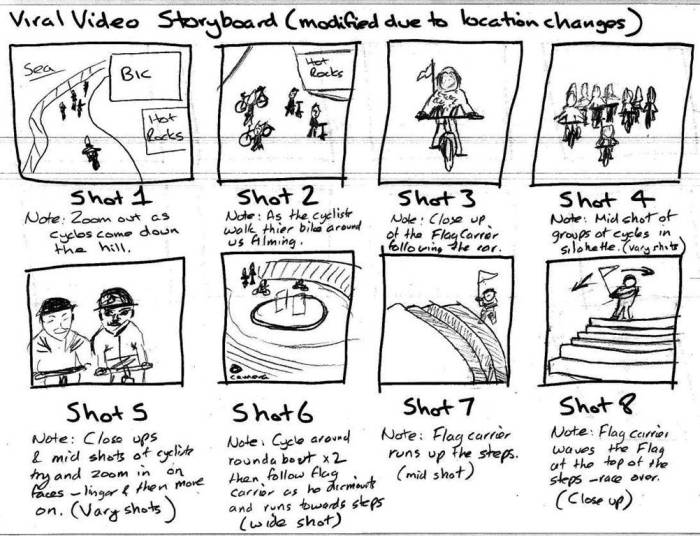
A storyboard’s visual appeal is just as crucial as its narrative. Effective visual design enhances comprehension, engagement, and overall impact. The following sections detail key aspects to consider when crafting visually compelling storyboards.
Color Palette Selection
Strategic color choices significantly influence mood, character representation, and scene setting. Here are five best practices for effective color palette use:
- Limit your palette: Restricting yourself to 3-5 core colors creates visual harmony and prevents overwhelming the viewer. Consider using analogous colors (located next to each other on the color wheel) for a cohesive feel or complementary colors (opposite each other) for contrast.
- Establish color associations: Assign specific colors to represent key characters, emotions, or locations. For example, consistently using blue for a calm character and red for an angry one establishes visual shorthand.
- Use color temperature to set mood: Warm colors (reds, oranges, yellows) generally evoke feelings of warmth, excitement, or danger, while cool colors (blues, greens, purples) often suggest calmness, serenity, or sadness.
- Consider color contrast for readability: Ensure sufficient contrast between text and background colors for easy readability. Tools like WebAIM’s contrast checker can help verify accessibility.
- Use color sparingly for emphasis: A pop of a contrasting color can draw attention to crucial elements or actions within a panel, enhancing visual hierarchy.
Font and Typography Selection
Font choices impact readability and contribute to the overall aesthetic. Consistency is key.
Select fonts that are easily legible, even at small sizes. Avoid using more than two distinct fonts in a single storyboard to maintain visual unity. Consider using a serif font (like Times New Roman or Garamond) for body text and a sans-serif font (like Arial or Helvetica) for headings or labels. Maintain consistent font sizes and styles throughout the storyboard for a professional look.
Visual Hierarchy
Visual hierarchy guides the viewer’s eye through the information presented in each panel.
Employ size, color, contrast, and placement to prioritize key elements. Larger images or text should command more attention than smaller ones. Strategic use of color can also direct the eye. For instance, a bright red object against a muted background will naturally draw attention. Careful placement of elements within a panel also contributes to visual flow. Place important elements in prominent locations, such as the center or the top of the panel.
Panel Size and Layout
Varying panel sizes and layouts helps control pacing and focus.
Larger panels can be used for expansive scenes or moments requiring detailed attention, while smaller panels can quickly convey minor actions or transitions. Experiment with different layouts (e.g., horizontal rows, vertical columns, or a combination) to create visual rhythm and guide the viewer’s experience. Consider using a wider panel to emphasize a dramatic moment or a narrower panel to depict a quick, less important action.
Image Editing Techniques
Improving storyboard visuals involves various techniques.
| Technique | Description | Pros | Cons |
|---|---|---|---|
| Color Correction | Adjusting brightness, contrast, saturation, and white balance. | Enhances mood, improves clarity. | Can be time-consuming if done manually. |
| Cropping and Resizing | Removing unwanted areas or adjusting dimensions. | Improves composition, focuses attention. | Can lose important details if overdone. |
| Sharpening | Increasing image sharpness and detail. | Improves clarity, especially for small details. | Can introduce noise or artifacts if overdone. |
| Filters and Effects | Applying pre-set or custom filters to alter appearance. | Adds stylistic flair, enhances mood. | Can appear artificial if overused. |
Effective Communication and Delivery
Presenting a storyboard effectively goes beyond simply showing the visuals; it’s about conveying your narrative clearly and engagingly. A strong presentation ensures your vision is understood and appreciated by your audience, leading to better collaboration and project outcomes. This section focuses on techniques for delivering a compelling and memorable storyboard presentation.
Common Mistakes to Avoid During Storyboard Presentations
Failing to effectively communicate your storyboard can derail your project before it even begins. Three common pitfalls to avoid include: Rushing through the presentation without allowing time for questions and discussion; focusing solely on the visuals without adequately explaining the narrative and intent behind each scene; and neglecting to tailor the presentation to the specific audience’s knowledge and interests. These mistakes can result in confusion, disengagement, and ultimately, a failure to secure buy-in for your vision.
Tailoring Presentations to Specific Audiences
Understanding your audience is paramount. A presentation to a group of seasoned filmmakers will differ significantly from one aimed at potential investors. For filmmakers, you might delve into technical details about shot composition and camera angles. For investors, your focus should be on the story’s commercial viability, potential return on investment, and market appeal. Always consider the audience’s prior knowledge, their interests, and their decision-making authority when structuring and delivering your presentation. For example, a presentation to a client might emphasize the visual style and brand alignment, while a presentation to a team of animators would focus on technical specifications and production workflows.
Tips for Maintaining Audience Engagement
Keeping your audience engaged requires a proactive approach. Five key strategies include: Start with a captivating hook—a striking image, a compelling question, or a brief, impactful anecdote. Use a variety of visual aids, such as close-ups of key storyboard panels, animation sequences (if available), and even props related to your project. Incorporate interactive elements, like polls or Q&A sessions, to encourage participation. Maintain a conversational tone, avoiding overly technical jargon and explaining complex concepts in simple terms. And finally, be enthusiastic and passionate about your project; your energy will be contagious.
Using Body Language and Vocal Delivery
Your body language and vocal delivery are as crucial as the content itself. Maintain eye contact with your audience, projecting confidence and credibility. Use natural hand gestures to emphasize key points, but avoid distracting mannerisms. Vary your vocal tone and pace to keep the presentation dynamic and prevent monotony. Pauses can be powerful tools, allowing the audience to process information and enhancing the impact of your message. A strong, clear voice, appropriate volume, and well-paced delivery significantly improve audience comprehension and engagement. For example, slowing down your speech when describing a particularly important scene emphasizes its significance.
Answering Audience Questions Effectively
Handling questions is a critical part of the presentation process. First, listen attentively to each question, ensuring you fully understand it before responding. If you don’t know the answer, it’s perfectly acceptable to admit it and promise to follow up. Structure your answers clearly and concisely, using visuals from your storyboard to illustrate your points where appropriate. If a question is unclear, politely ask for clarification. Finally, thank the audience for their questions, showing appreciation for their engagement and interest in your work. A well-managed Q&A session demonstrates your expertise and commitment to your project.
Summary
Mastering the art of storyboard presentation is a journey of continuous learning and refinement. By focusing on crafting a compelling narrative, employing effective visual design principles, and delivering a confident and engaging presentation, you can transform your storyboard from a simple planning tool into a powerful communication instrument. Remember to practice, seek feedback, and continuously adapt your approach to resonate with your specific audience. The result? Storyboards that not only communicate your vision effectively but also inspire and captivate.