Unlock your inner storyteller with this beginner-friendly guide to storyboarding. We’ll demystify the process, guiding you through five crucial steps to create compelling visuals that bring your narratives to life, whether you’re crafting a film, animation, or video game. Learn to translate your ideas into impactful visuals, mastering techniques for conveying emotion, action, and dialogue with clarity and precision.
From understanding fundamental principles and choosing the right tools to mastering panel composition and integrating text, this guide provides practical, step-by-step instructions and insightful examples to help you create professional-quality storyboards. Prepare to transform your storytelling from concept to captivating visual narrative.
Understanding Storyboarding Fundamentals

Storyboarding is a visual planning tool used across various creative industries to pre-visualize a narrative sequence. It’s essentially a comic-strip-like representation of a story, outlining key scenes, actions, and dialogue before production begins. This process offers significant benefits in terms of pre-production planning, communication, and ultimately, the final product’s quality.
Storyboarding helps clarify the narrative flow, identify potential problems early on, and facilitates efficient collaboration among team members. It provides a shared visual language, allowing directors, animators, designers, and other creatives to understand and contribute to the project’s vision effectively. The resulting storyboard becomes a crucial roadmap throughout the entire production process.
Storyboarding Techniques for Different Media
Different media require tailored storyboarding approaches. Film storyboards typically focus on camera angles, shot composition, and actor movements. Each frame represents a single shot, often including annotations specifying camera type, lens, and action. Animation storyboards, on the other hand, emphasize character animation, expressions, and scene transitions. They often include detailed character sketches and notes on animation style. Video game storyboards might illustrate game screens, user interface elements, character interactions, and camera movements within the game environment. They often incorporate flowcharts to show branching paths and player choices.
Examples of Effective Storyboards Across Different Genres
A compelling science fiction film storyboard might depict a spaceship approaching a desolate planet, using wide shots to establish scale and close-ups to emphasize character reactions. A heartwarming romantic comedy storyboard could showcase a series of intimate scenes between the main characters, utilizing close-ups to capture emotions and medium shots to show their interactions within their environment. A thrilling action movie storyboard might use dynamic camera angles and quick cuts to convey the intensity of fight scenes, showing characters’ movements and weapon usage. A suspenseful horror storyboard could use shadow play and dark backgrounds to create a sense of dread, with careful framing to build tension and anticipation.
A Simple Storyboard Template for Beginners
A basic storyboard template can be created using graph paper or a simple digital drawing program. Each frame should be clearly labeled with a number and a brief description of the scene’s action and dialogue. Include rough sketches of the characters, setting, and key action elements within each frame. Below each frame, add notes indicating camera angles, shot types (e.g., close-up, long shot), and any special effects or sound effects. Maintaining consistency in size and style across frames ensures readability and a professional look. A simple layout with four frames per page is a good starting point for beginners.
Comparison of Storyboarding Software
| Software | Pros | Cons | Best For |
|---|---|---|---|
| Storyboard Pro | Powerful features, extensive libraries, professional-grade output | Steep learning curve, expensive | Professional animators and filmmakers |
| Adobe Photoshop | Widely accessible, versatile tool, good for image manipulation | Not specifically designed for storyboarding, can be cumbersome | Beginners, those already familiar with Photoshop |
| Celtx | Free version available, integrates with other production tools | Fewer features than dedicated storyboarding software | Beginners, low-budget projects |
| PowerPoint | Readily available, easy to use for basic storyboards | Limited artistic capabilities, less professional look | Very basic storyboards, quick brainstorming |
Creating Compelling Storyboard Panels

Crafting compelling storyboard panels involves more than just sketching; it’s about visually translating a narrative’s essence. Each panel should contribute to the overall story, carrying weight and contributing to the viewer’s understanding. This section will explore techniques to achieve this visual storytelling prowess.
Effective visual storytelling relies on clear communication. A well-executed storyboard panel needs to instantly convey the scene’s setting, characters’ emotions, and the action unfolding. This is achieved through a careful combination of composition, character design, and visual cues.
Visual Storytelling Techniques
Conveying emotion and action through visuals requires a nuanced approach. Consider using exaggerated expressions to emphasize feelings, dynamic poses to showcase movement, and strategically placed visual elements to highlight key details. For example, a character’s slumped posture and downcast eyes can immediately communicate sadness, while a clenched fist and furrowed brow suggest anger. Similarly, action lines and motion blur can effectively illustrate movement and speed. The key is to be economical in your use of visual elements; too much detail can be overwhelming, while too little can leave the viewer confused.
Panel Composition and Layout
Panel composition significantly impacts how a viewer interprets the story. Consider the rule of thirds, leading lines, and negative space to guide the eye and create visual interest. The rule of thirds suggests placing key elements off-center, creating a more dynamic and engaging composition. Leading lines, such as roads or fences, can draw the viewer’s eye towards a focal point. Effective use of negative space (empty areas) can emphasize key elements and create a sense of balance. The layout of panels on the page also affects pacing and rhythm. Larger panels can emphasize important scenes, while smaller panels can quickly convey transitional moments.
Guiding the Viewer’s Eye
Visual cues are crucial for directing the viewer’s attention within each panel. These cues can include line of sight, arrows, color contrast, and directional lighting. For example, a character’s gaze can naturally draw the viewer’s eye towards a specific object or another character. Similarly, a brighter or more saturated color can highlight an important element, while strategically placed shadows can create depth and mystery.
Example Storyboard Panel
Imagine a scene: A lone figure stands silhouetted against a bright sunset, overlooking a vast, empty field. The panel would be dominated by the vastness of the sky, painted in vibrant oranges and reds. The figure, small in comparison, would be positioned slightly off-center, according to the rule of thirds. Their posture would be slightly hunched, conveying a sense of loneliness or contemplation. Long, thin lines could extend from the figure towards the horizon, visually guiding the viewer’s eye across the expansive landscape. The overall color palette would be warm and melancholic, reflecting the mood of the scene. The lack of other visual elements besides the figure and the sunset would allow the viewer to focus on the figure’s isolation and the vastness of the landscape. This simplicity, combined with the visual cues, effectively communicates the scene’s atmosphere and the character’s emotional state without needing excessive detail.
Integrating Text and Dialogue into Storyboards
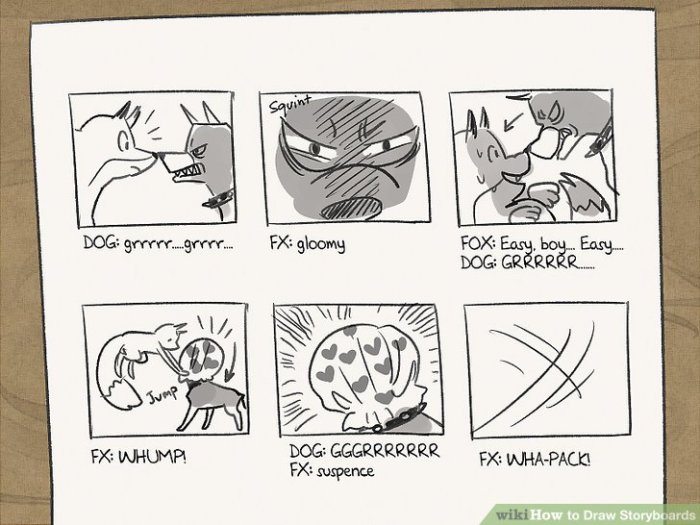
Storyboards aren’t just about visuals; they’re about telling a complete story. Effectively integrating text and dialogue is crucial for conveying the narrative’s nuances and ensuring clear communication between the storyboard artist and the production team. This involves strategically placing dialogue, indicating sound effects, and clarifying camera directions within the panels themselves.
Adding text and dialogue enhances the storyboard’s clarity and provides essential information about the scene’s action and emotional tone. Proper integration ensures a cohesive visual and textual narrative, streamlining the production process and preventing misunderstandings.
Methods for Incorporating Dialogue and Narration
Dialogue and narration are typically placed within speech balloons or narration boxes directly on the storyboard panel. Dialogue balloons, usually pointing towards the character speaking, should be clear and easy to read. Narration boxes, often rectangular and set apart from the main action, provide contextual information or internal thoughts. The font size and style should be consistent throughout the storyboard to maintain a professional look. Consider using different font styles or sizes to distinguish between narration and dialogue, or between different characters’ dialogue. For example, a larger, bolder font might be used for a character shouting, while a smaller, italicized font could represent a whisper.
Indicating Camera Angles, Transitions, and Sound Effects
Camera angles, transitions, and sound effects are typically indicated using concise notations within or adjacent to the storyboard panels. Camera angles can be indicated using standard abbreviations (e.g., CU for close-up, LS for long shot, MS for medium shot, etc.). Transitions can be represented by symbols or abbreviations (e.g., CUT TO, FADE OUT, DISSOLVE). Sound effects are usually written directly onto the panel, often enclosed in parentheses or using a standard symbol like a musical note or a lightning bolt for a sound effect. For instance, a panel showing a car crash might include “(CRASH! SCREECH!)” or a simple symbol to represent the sound.
Visual Representation of Different Shot Types
A close-up (CU) shot would focus on a character’s face, emphasizing their expression. A long shot (LS) would show the character within their environment, establishing the setting. A medium shot (MS) would frame the character from the waist up, balancing intimacy and environmental context. These shot types are visually represented by the size and framing of the character within the panel. A close-up would fill most of the panel with the character’s face, while a long shot would show a more expansive view. Consider using a consistent aspect ratio for all panels to maintain visual uniformity. For example, a consistently wider panel might represent a panoramic view while a more square panel might show a closer view.
Storyboard Sequence Example
Imagine a scene where two characters, ANNA and BEN, are arguing in a dimly lit alleyway.
Panel 1: LS – Anna and Ben stand facing each other in a dark alleyway. Rain falls. (SOUND of rain) ANNA: “I can’t believe you did that!”
Panel 2: MS – Anna’s face, close-up, showing anger. ANNA: “It was so thoughtless!”
Panel 3: MS – Ben’s face, close-up, showing guilt. BEN: (Whispering) “I’m sorry…”
Panel 4: CU – Anna’s hand reaching out to Ben, then pulling away. (SOUND of a sigh)
Panel 5: LS – Anna walks away, leaving Ben alone in the rain. FADE OUT.
Best Practices for Concise Scene Descriptions
A concise scene description is vital for clarity. Here are some best practices:
- Use strong verbs and avoid unnecessary adjectives.
- Focus on the essential action and emotion.
- Keep descriptions brief and to the point.
- Use consistent terminology for camera angles and transitions.
- Prioritize visual storytelling over lengthy descriptions.
End of Discussion
Mastering the art of storyboarding is a journey of visual storytelling, transforming abstract ideas into tangible, compelling narratives. By following these five essential steps, you’ve equipped yourself with the foundational skills to effectively communicate your vision. Remember, practice is key; experiment with different techniques, find your style, and watch your storytelling flourish. Embrace the power of visual communication, and let your stories unfold.