Visual storytelling is paramount in filmmaking, and storyboarding serves as the crucial bridge between script and screen. This comprehensive guide delves into the art and science of storyboarding, providing a foundational understanding for both aspiring and experienced filmmakers. We’ll explore fundamental techniques, advanced strategies, and the technological tools that empower effective visual communication.
From understanding basic panel composition and different storyboard types to mastering advanced techniques like visual metaphors and leveraging software for efficient workflows, this guide offers a practical and insightful journey into the world of pre-visualization. Learn how to translate your vision into compelling visuals that will elevate your filmmaking process.
Understanding Storyboarding Fundamentals
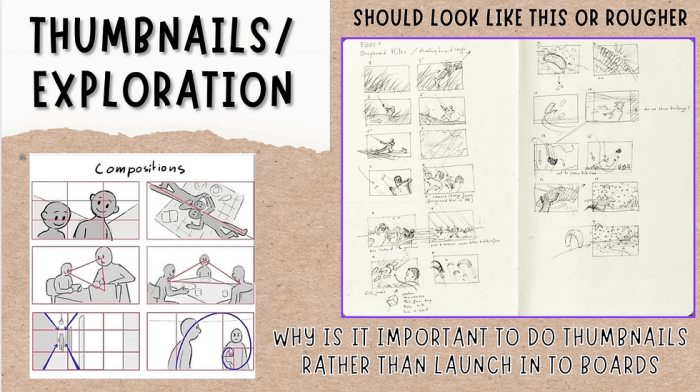
Storyboarding is a crucial pre-production process in filmmaking, serving as a visual roadmap for the entire production team. It translates the script’s narrative into a series of sequential images, allowing for a clear visualization of shots, camera angles, character movements, and overall scene pacing before a single frame is filmed. This significantly reduces production costs and time by identifying potential issues early on and facilitating smoother collaboration among crew members.
Storyboarding provides a shared visual language for everyone involved in the filmmaking process. It helps directors to communicate their vision effectively to cinematographers, actors, editors, and other crew members. This shared understanding minimizes misunderstandings and ensures that the final product aligns with the director’s artistic intent. The process also allows for creative experimentation and refinement of the visual storytelling before committing to expensive and time-consuming filming.
Storyboard Types and Their Applications
Different types of storyboards cater to specific needs during the filmmaking process. The choice of storyboard type depends on the project’s scope, budget, and desired level of detail.
- Animatic Storyboards: These storyboards are essentially moving storyboards. They incorporate rough animation or video footage to simulate the final look and feel of the scene, providing a more dynamic preview of the sequence. Animatics are particularly useful for complex action scenes or scenes requiring intricate visual effects.
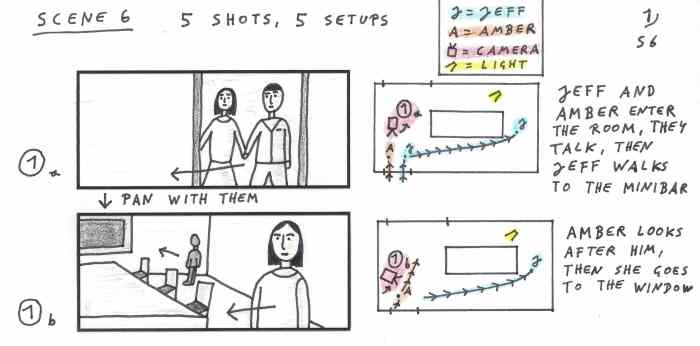
- Technical Storyboards: These focus on the technical aspects of filmmaking, such as camera angles, lens choices, lighting setups, and special effects. They often include detailed annotations specifying technical requirements for each shot.
- Photomatic Storyboards: These storyboards use actual photographs to represent the scene, often incorporating elements from the shooting location or using stock photography to create a realistic representation. This approach is particularly helpful for visualizing locations and establishing shots.
- Rough Storyboards: These are quick sketches used in the initial stages of planning, primarily for brainstorming and conveying the overall flow of the story. They are less detailed than other storyboard types and serve as a foundation for more refined storyboards.
Creating a Basic Storyboard: A Step-by-Step Guide
The process of creating a storyboard involves several key steps to ensure clarity and consistency.
- Read and Analyze the Script: Thoroughly understand the scene’s action, dialogue, and emotional tone.
- Break Down the Scene into Shots: Divide the scene into individual shots, considering the narrative progression and visual impact of each shot.
- Sketch Each Shot: Create a thumbnail sketch for each shot, focusing on composition, camera angles, character positions, and key actions.
- Add Details: Refine the sketches, adding details such as props, costumes, lighting, and background elements.
- Annotate the Storyboard: Include notes on camera angles, shot sizes (e.g., wide shot, close-up), lens types, action descriptions, dialogue, and sound effects.
- Organize and Sequence: Arrange the panels in chronological order, ensuring a smooth visual flow.
Example Storyboard: A Simple Scene
Let’s consider a simple scene: A young woman (ANNA) sits at a cafe, reading a book. A man (MARK) approaches her table.
Imagine a storyboard panel. Panel 1 shows a wide shot of a bustling outdoor cafe. Anna is seated at a small table, engrossed in her book. The camera angle is slightly high, emphasizing her solitude. Panel 2 is a medium shot focusing on Anna, her expression peaceful. Panel 3 shows Mark approaching the table from a low angle, creating a sense of anticipation. Panel 4 is an over-the-shoulder shot from Anna’s perspective, showing Mark approaching. Panel 5 shows a close-up of Anna’s surprised expression as Mark speaks. Each panel includes concise annotations: Panel 1: “Wide shot, sunny day, bustling cafe”; Panel 5: “Close up, Anna surprised, SOUND: Mark’s voice, ‘Excuse me…'”.
Organizing Storyboard Panel Elements
Each storyboard panel should clearly communicate the visual and auditory elements of the scene. Effective organization is key to understanding the shot.
| Element | Description | Example |
|---|---|---|
| Action | Description of the main action taking place in the shot. | “Anna sips her coffee.” |
| Dialogue | Any spoken words in the shot, usually placed within a speech bubble. | “This book is amazing!” |
| Sound Effects | Any non-dialogue sounds, such as ambient noise or sound effects. | “SOUND: Birds chirping, cafe chatter” |
Advanced Storyboarding Techniques
Storyboarding isn’t just about sketching out shots; mastering advanced techniques elevates it from a planning tool to a powerful storytelling instrument. This section delves into refining your skills, exploring diverse styles, and leveraging visual language to craft compelling narratives.
Storyboard Styles and Their Effectiveness
Different storyboarding styles cater to varying needs and project aesthetics. For instance, a minimalist style, employing simple shapes and lines, might suit a fast-paced action film, prioritizing clarity and speed of comprehension over intricate detail. Conversely, a highly detailed, painterly style could be ideal for a period drama, emphasizing atmosphere and character nuance. The choice depends on the film’s genre, target audience, and desired visual tone. A realistic style mimics the final film’s look, aiding in pre-visualization, while a more abstract approach allows for greater creative freedom and exploration of visual concepts. Effectiveness is measured by how well the chosen style supports the narrative and enhances the storytelling process.
Visual Metaphors and Symbolism in Storyboards
Storyboards offer a canvas for visual storytelling beyond literal representation. Employing visual metaphors and symbolism can add layers of meaning and subtext, enriching the audience’s experience. For example, a recurring image of a wilting flower could subtly represent a character’s declining health or emotional state. Similarly, the use of specific colors (e.g., red for danger, blue for tranquility) can convey mood and emotion effectively. The key is to use these elements judiciously, ensuring they are integrated seamlessly into the narrative and readily understandable to the viewer. Overuse can lead to confusion and detract from the story.
Storytelling and Narrative Structure in Storyboard Creation
Effective storyboarding intrinsically ties to a strong understanding of narrative structure. The storyboard should visually reflect the film’s three-act structure (setup, confrontation, resolution), pacing, and character arcs. Each panel should contribute to the overall narrative flow, building tension, revealing character motivations, and ultimately leading the viewer towards a satisfying resolution. Careful consideration of shot composition, camera angles, and transitions is crucial in maintaining narrative momentum and guiding the audience’s emotional journey. A well-structured storyboard acts as a roadmap for the film’s narrative, ensuring a cohesive and engaging viewing experience.
Examples of Effective Storyboarding in Popular Films
The impact of meticulous storyboarding is evident in many successful films. The pre-visualization process allows directors to refine shots, plan complex action sequences, and ensure visual consistency.
| Film | Director | Storyboarding Contribution to Success |
|---|---|---|
| The Lord of the Rings: The Fellowship of the Ring | Peter Jackson | Extensive storyboarding helped visualize the epic scope and complex action sequences, ensuring a seamless blend of practical effects and CGI. The detailed boards aided in coordinating the large cast and crew, resulting in a visually stunning and coherent film. |
| Mad Max: Fury Road | George Miller | Miller’s meticulous storyboarding, almost shot-for-shot, was crucial in orchestrating the film’s chaotic and visually breathtaking action sequences. The boards allowed for precise planning and execution of complex stunts and camera movements, resulting in a highly dynamic and immersive cinematic experience. |
| Spider-Man: Into the Spider-Verse | Phil Lord & Chris Miller | The unique visual style of this animated film was meticulously planned through storyboarding. The boards helped define the distinctive comic-book aesthetic, incorporating dynamic camera angles and innovative visual effects, resulting in a visually groundbreaking and critically acclaimed film. |
| Pulp Fiction | Quentin Tarantino | While Tarantino is known for his improvisational style, even his films benefit from storyboarding. The boards for Pulp Fiction, while possibly less detailed than some others, helped plan the non-linear narrative and complex scene transitions, ensuring the film’s unique structure was clear and engaging. |
Storyboard for a Complex Scene
Imagine a scene: Two detectives, ANNA and BEN, interrogate a suspect, MARK, in a dimly lit interrogation room. Anna is stern and direct, while Ben is more subtle and observant. Mark is nervous and evasive.
(Panel 1): WIDE SHOT – The interrogation room. Anna sits opposite Mark, her expression serious. Ben observes from a corner, taking notes. The lighting is harsh, casting shadows on Mark’s face. This establishes the setting and the characters’ positions.
(Panel 2): MEDIUM SHOT – Anna leans forward, intensely questioning Mark. Close-up on Mark’s hands, fidgeting nervously. This focuses on Anna’s aggression and Mark’s discomfort.
(Panel 3): CLOSE-UP – Mark’s sweating brow, his eyes darting around. This emphasizes Mark’s anxiety.
(Panel 4): OVER-THE-SHOULDER SHOT (from Anna’s perspective) – Mark’s tense posture, avoiding eye contact. This highlights the power dynamic between Anna and Mark.
(Panel 5): TWO-SHOT – Ben subtly gestures to Anna, indicating a discrepancy in Mark’s story. This introduces Ben’s role in the interrogation.
(Panel 6): MEDIUM SHOT – Anna confronts Mark with the inconsistency. Mark visibly pales. This shows the impact of Ben’s observation.
(Panel 7): CLOSE-UP – Mark’s hesitant confession, his eyes downcast. This is the climax of the scene.
(Panel 8): WIDE SHOT – Anna and Ben exchange a look of satisfaction, the interrogation concluded. This resolves the scene and highlights the detectives’ success.
Transitions between panels would use standard cuts, with a possible slow zoom in on Mark’s face during his confession for added dramatic effect. The overall mood is tense and suspenseful, built through careful shot selection and character positioning.
Storyboarding Software and Workflow
Storyboarding software significantly streamlines the filmmaking process, allowing for efficient collaboration and iterative design. Choosing the right software and establishing a robust workflow are crucial for creating compelling storyboards that effectively communicate your vision. This section will explore various software options, detail a typical workflow, and offer tips for collaboration and management.
Storyboarding Software Options
Several software options cater to different needs and budgets. Popular choices include Adobe Photoshop, Storyboarder (free and open-source), Toon Boom Harmony, and specialized applications like FrameForge. Each offers a unique set of features and caters to different workflows.
- Adobe Photoshop: A versatile industry standard, offering powerful image manipulation tools, but requiring a subscription and potentially a steeper learning curve for beginners focused solely on storyboarding.
- Storyboarder: A free and open-source option specifically designed for storyboarding, prioritizing ease of use and collaboration features. Its simplicity is a strength for beginners, but it may lack the advanced features of professional-grade software.
- Toon Boom Harmony: A professional-grade animation software with robust storyboarding capabilities. It offers advanced features for animation and visual effects but comes with a high price tag and a complex interface.
- FrameForge: This software focuses specifically on 3D storyboarding, offering a more realistic representation of scenes. However, it demands a higher learning curve and is often more expensive than 2D options.
Creating a Storyboard Workflow
A typical storyboard workflow involves several key stages, from script analysis to final revisions. Efficient management of this process is key to avoiding bottlenecks and ensuring a cohesive final product.
- Script Breakdown: Carefully read and analyze the script, identifying key scenes, actions, and dialogue. Note significant emotional shifts or turning points.
- Thumbnailing: Create quick, rough sketches of each scene, focusing on composition and key action. This stage prioritizes capturing the essence of each shot rather than detailed artwork.
- Software Implementation: Import your thumbnails into your chosen software. Begin refining the sketches, adding detail to characters, backgrounds, and props.
- Panel Refinement: Ensure each panel clearly communicates the action and emotion. Experiment with camera angles and perspectives to enhance storytelling.
- Revisions and Feedback: Share your storyboard with collaborators (directors, producers, etc.) for feedback. Iterate based on their input, refining the storyboard until it aligns with the overall vision.
- Final Output: Export the storyboard in a suitable format (PDF, image sequence) for distribution and use in pre-production.
Collaborating on Storyboards
Effective collaboration is essential for a successful storyboard. Utilizing cloud-based storage and version control systems can streamline the process and prevent conflicts. Regular feedback sessions and clear communication channels are crucial.
Software like Storyboarder, with its built-in collaboration features, facilitates shared access and simultaneous editing. For other software, utilizing cloud storage services like Google Drive or Dropbox allows multiple users to access and modify the storyboard files. Establishing clear communication protocols, such as regular meetings or online discussion forums, helps keep everyone informed and on the same page.
Efficient Storyboard Management
Organization is key to maintaining a manageable and easily navigable storyboard. A clear naming convention for files, a consistent panel layout, and well-defined scene breakdowns contribute to efficient workflow.
Using a consistent file naming system (e.g., Scene_01_Shot_01.jpg) helps maintain order. A well-structured folder system, potentially separating scenes or acts, further improves organization. Creating a legend or key that explains any visual shorthand used within the storyboard ensures clarity for all stakeholders.
Sample Storyboard Creation using Storyboarder
Let’s illustrate a simple scene using Storyboarder. We’ll focus on a character entering a dark room.
- Panel Creation: Open Storyboarder and create three panels. Adjust panel size and aspect ratio to fit your desired composition.
- Rough Sketching: In each panel, sketch a quick representation of the character (a simple stick figure will suffice at this stage) approaching the door, opening the door, and stepping inside the dark room. Note the changing light levels and character’s posture.
- Refinement: Refine the sketches, adding more detail to the character and environment. Consider adding simple shading to enhance the sense of darkness in the room.
- Adding Dialogue and Notes: Add dialogue or narration to the panels where appropriate. Use Storyboarder’s note function to add descriptions of sound effects or camera movements.
- Exporting: Export the storyboard as a PDF or image sequence for review and sharing.
Last Recap
Mastering storyboarding isn’t merely about sketching out scenes; it’s about crafting a visual narrative that resonates with your audience. By understanding the fundamentals, exploring advanced techniques, and utilizing the right tools, you can transform your storyboards from simple sketches into powerful pre-visualization tools that streamline production and enhance the final product. This guide has equipped you with the knowledge and skills to elevate your filmmaking to new heights through the power of visual storytelling.