Storyboarding, a crucial pre-production process in filmmaking and animation, transforms abstract ideas into compelling visual narratives. This journey, from initial concept to final product, can be broken down into three distinct phases: Idea Generation and Development, Storyboard Creation and Design, and Execution and Refinement. Understanding these phases is key to crafting effective storyboards that clearly communicate the vision and guide the creative process.
Each phase presents unique challenges and opportunities. The initial phase involves brainstorming, concept refinement, and exploring various narrative approaches. The second phase focuses on the visual representation, panel layout, and incorporation of elements like sound and dialogue to enhance narrative flow. Finally, the execution and refinement phase emphasizes iteration, collaboration, and the use of appropriate software or techniques to finalize the storyboard.
Idea Generation and Development
Storyboarding begins long before the first sketch. The initial phase focuses on generating and refining ideas, transforming abstract concepts into concrete visual narratives. This involves brainstorming, exploring different perspectives, and iteratively improving the core concept until it’s ready for visual representation. Effective idea generation is crucial for creating compelling and impactful storyboards.
This process often involves a blend of creative thinking and analytical planning. It’s about finding the most effective way to communicate your message visually, considering the target audience and the desired emotional response. The following examples illustrate how to approach this crucial first step.
Storyboarding a Complex Scientific Concept
The challenge of visually representing complex scientific concepts lies in simplifying them without sacrificing accuracy. Consider explaining the process of photosynthesis. Instead of a dense diagram, a storyboard could depict sunlight hitting a leaf (panel 1), showing the leaf absorbing light energy (panel 2), then depicting the conversion of carbon dioxide and water into glucose and oxygen within the chloroplasts (panel 3), culminating in the release of oxygen (panel 4). Each panel would use simple, clear visuals, avoiding scientific jargon and focusing on the core process. Color-coding could highlight different elements, such as green for chlorophyll and blue for water.
Depicting a Character’s Emotional Journey
To illustrate a character’s emotional journey, color palettes are powerful tools. Imagine a character experiencing grief. The initial panels might be saturated with bright, vibrant colors reflecting their normal life. As the event unfolds, the colors gradually desaturate, becoming muted and grey to mirror the character’s emotional state. The use of dark blues and purples could emphasize sadness and isolation. As the character begins to heal, warmer tones, such as oranges and yellows, could subtly reappear, representing hope and recovery. Each panel’s color scheme would directly correlate with the character’s emotional progression.
Alternative Narrative Styles for the Same Scene
Let’s consider a scene where a character discovers a hidden treasure chest. A comedic storyboard might show the character tripping over the chest, exaggerated expressions of surprise, and slapstick reactions. A dramatic storyboard would focus on suspenseful lighting, close-ups on the character’s awestruck face, and the chest’s mysterious contents hinted at only partially. A suspenseful storyboard would emphasize shadows, mysterious figures lurking nearby, and the character’s cautious approach to the chest, raising questions about its contents and potential dangers. The effectiveness of each style depends on the desired audience response and overall narrative goals. The comedic version aims for lighthearted entertainment, the dramatic one for emotional impact, and the suspenseful one for tension and intrigue.
Transforming a Simple Sentence into a Visual Narrative
Consider the sentence: “The old lighthouse keeper felt a tremor beneath his feet.” A storyboard could depict the keeper, an elderly man with weathered features, tending to his lamp (panel 1). The next panel would show a subtle shaking of the floor beneath his feet, depicted by slightly blurred lines and a tilted lamp (panel 2). The final panel could showcase his worried expression, highlighting the tremor’s impact through his body language and facial features (panel 3). This transforms a simple sentence into a visual sequence that conveys emotion and builds tension.
Using Visual Metaphors for Abstract Ideas
To represent the concept of “fragile hope,” a storyboard could use a delicate glass butterfly perched precariously on a windswept cliff edge. The butterfly represents hope, its fragility symbolizing the precarious nature of hope itself. The windswept cliff signifies the challenges and obstacles that threaten to extinguish it. The visual metaphor is more effective than a literal representation, offering a more evocative and memorable message.
Storyboard Creation and Design
Transforming your developed ideas into a visual narrative requires careful consideration of layout, panel arrangement, and visual storytelling techniques. This stage focuses on crafting a clear and engaging visual representation of your story, ensuring smooth transitions and effective communication of plot points. The goal is to create a blueprint that guides the animation process, maintaining consistency and narrative flow.
The ideal storyboard layout facilitates clear comprehension and efficient workflow. Panel size and aspect ratio should be consistent throughout, mirroring the final output’s intended format (e.g., widescreen, square). While there’s no single “perfect” layout, aiming for a balance between detailed information and visual clarity is key. Overly cluttered panels hinder understanding, while overly sparse panels may lack narrative depth. A common approach involves using panels of similar sizes, arranged in a clear sequence, allowing for a smooth visual flow.
Panel Size, Aspect Ratio, and Arrangement
Panel size is largely determined by the project’s needs and intended use. For a short film, larger panels might be preferred to showcase detailed action sequences. Conversely, a series of comic panels might benefit from smaller, more numerous panels to convey a faster pace. The aspect ratio, the ratio of width to height, is usually consistent with the final output’s intended format (e.g., 16:9 for widescreen, 1:1 for square). Arrangement is crucial for pacing. A series of wide, horizontal panels might suggest a sense of expansive space or a slow, deliberate movement. Smaller, vertical panels can convey a faster pace or a feeling of claustrophobia. Experimentation is encouraged to find the most suitable arrangement for the specific story.
Effective Storytelling Techniques within Storyboard Panels
Individual panels are mini-scenes, requiring careful consideration of camera angles and character positioning. A low-angle shot can make a character appear powerful, while a high-angle shot might suggest vulnerability. Character positioning within the frame impacts the narrative. A character positioned centrally might indicate importance, while one placed off-center might suggest isolation or insignificance. The use of visual cues, such as lighting, shadows, and color, further enhances the emotional impact and narrative depth of each panel.
Incorporating Sound Effects and Dialogue
Adding sound effects and dialogue directly onto the storyboard enhances the narrative flow and helps visualize the audio elements of the final product. This can be achieved through simple annotations within the panels. For example, a speech bubble containing dialogue, or an annotation like “SFX: Thunderclap” next to a panel depicting a stormy sky. Including sound effects in the storyboard ensures the audio and visuals are carefully considered in tandem, resulting in a more cohesive final product.
Visual Transitions to Guide Viewer’s Eye and Maintain Pacing
Visual transitions between panels are crucial for guiding the viewer’s eye and maintaining the desired pacing. Simple transitions, such as a direct cut, are effective for maintaining a fast pace. A dissolve can create a smoother transition between scenes, suggesting a passage of time or a change in mood. A wipe, where one panel seemingly sweeps across to reveal the next, can add a more dynamic feel. The choice of transition depends entirely on the intended effect and narrative flow.
Storyboard Panel Conveying a Plot Twist
Consider a panel depicting a seemingly ordinary family dinner. The characters are positioned around a table, engaged in pleasant conversation. However, a subtle detail – a single, blood-stained knife subtly placed under the table – hints at a hidden tension and foreshadows a significant plot twist. This visual detail, without any dialogue or explicit action, instantly creates suspense and intrigue, leaving the viewer to anticipate the unfolding events.
Execution and Refinement
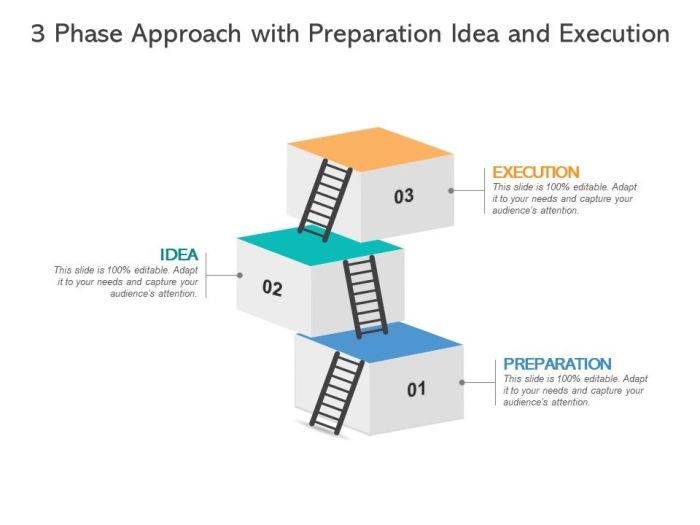
The final phase of storyboarding, execution and refinement, involves transforming the carefully crafted storyboard into a polished, collaborative product ready for use in pre-production or presentation. This stage is crucial, as it’s where the initial vision is tested, refined, and ultimately brought to life. Feedback, iteration, and the effective use of technology are all key components of a successful execution phase.
This process is iterative, meaning the storyboard will likely undergo several revisions based on feedback from directors, animators, producers, or other stakeholders. The goal is to ensure clarity, consistency, and effective communication of the visual narrative. This iterative approach allows for improvements in pacing, clarity, and overall visual appeal.
Storyboard Revision and Communication
Effective communication of storyboard revisions is paramount. Changes should be clearly annotated using visual aids such as arrows, circles, and text boxes directly on the storyboard itself. For example, an arrow could point to a character’s pose with a note explaining a necessary adjustment: “Adjust pose for more dynamic action.” Color-coding revisions can also be helpful, perhaps using red for major changes and blue for minor adjustments. Clear and concise language ensures everyone understands the intended modifications. Providing a separate revision sheet detailing all changes and their rationale can further enhance understanding and facilitate efficient collaboration.
Digital Storyboarding Software and Features
Digital storyboarding software offers significant advantages over traditional hand-drawn methods. Programs like Storyboard Pro, Toon Boom Harmony, or even simpler options like Photoshop or PowerPoint allow for easy revisions, collaboration, and efficient workflow. Key features include the ability to easily move, resize, and modify individual panels; the ability to import and manipulate assets like character designs and backgrounds; and the option to create animated storyboards, showcasing movement and transitions. For example, using the onion skinning feature in Storyboard Pro allows animators to see previous frames while drawing, improving fluidity and consistency in the animation. The ability to export storyboards in various formats (PDF, image sequences) for easy sharing and printing is another crucial feature.
Comparison of Storyboard Creation Methods
Hand-drawn storyboards offer a unique tactile quality and often foster a more spontaneous and creative process. However, they are time-consuming to revise and can be difficult to share and collaborate on efficiently. Digital storyboarding, on the other hand, offers speed, ease of revision, and efficient collaboration tools. However, the digital approach might lack the immediate expressiveness of hand-drawn sketches and requires familiarity with the software. The choice between methods often depends on the project’s scale, budget, and the team’s skill set. A hybrid approach, combining hand-drawn sketches for initial brainstorming and digital tools for refinement and final production, can often provide the best of both worlds.
Presentation of Storyboard Development Stages
A presentation outlining the storyboard development process could begin with an overview of the initial concept and the ideation phase, showing early sketches and mood boards. The presentation would then move on to the development stage, showcasing the evolution of characters, settings, and the narrative structure. The creation and design phase would be presented next, highlighting the key visual elements and the style guide. Finally, the execution and refinement stage would be illustrated with examples of revisions, feedback incorporation, and the final polished storyboard. The presentation would emphasize the iterative nature of the process and the importance of collaboration throughout.
Final Summary
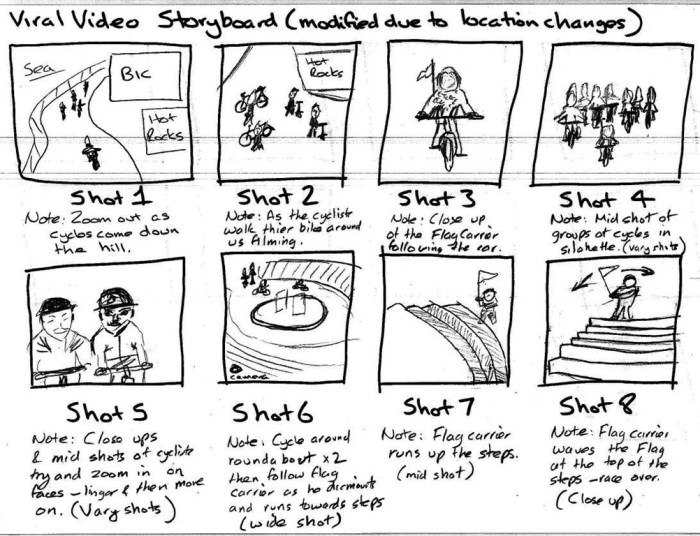
Mastering the three phases of storyboarding—from initial concept to final execution—is a skill that elevates any visual storytelling project. By systematically approaching idea generation, design, and refinement, creators can ensure their storyboards effectively communicate their vision, guide production, and ultimately contribute to a more successful final product. The iterative nature of the process allows for continuous improvement and adaptation, leading to stronger and more impactful narratives.