Visual storytelling is a powerful tool, and storyboarding is its cornerstone. This guide provides a streamlined approach to mastering the art of storyboarding, taking you from understanding fundamental concepts to creating compelling visual narratives in five simple steps. Whether you’re crafting a film, animation, or game, this practical guide will equip you with the skills to effectively communicate your vision through dynamic visuals.
We’ll explore the essential components of a storyboard, from sketching techniques and panel layouts to effectively conveying dialogue, action, and camera angles. You’ll learn how to brainstorm effectively, create a simple template, and even enhance your storyboards with advanced techniques like incorporating mood and atmosphere. By the end, you’ll be confident in your ability to create clear, concise, and engaging storyboards that bring your creative projects to life.
Understanding the Basics of Storyboarding
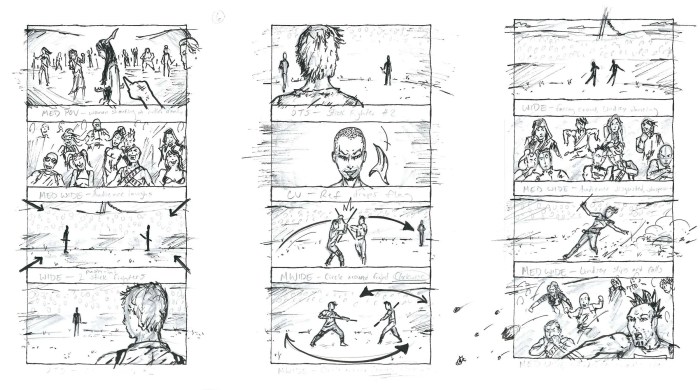
Storyboarding is a visual planning tool used across various creative industries to pre-visualize a narrative. It’s essentially a comic-strip-like sequence of images, each representing a key moment or shot in a film, animation, video game, or other visual project. This process helps to organize the story’s flow, identify potential problems, and communicate a vision effectively to collaborators.
Storyboarding facilitates clear communication and collaboration among team members. By providing a visual representation of the intended narrative, it helps to align everyone’s understanding of the story’s pacing, action, and emotional impact. This shared understanding leads to a more efficient and effective production process.
Core Components of a Storyboard
A storyboard typically consists of individual frames, each depicting a scene or shot. Each frame usually includes a drawing or sketch of the scene, along with annotations describing camera angles, character actions, dialogue, and other relevant details. These annotations are crucial for conveying the nuances of the scene and ensuring everyone is on the same page. A storyboard might also include scene numbers, shot descriptions, and other technical information.
Storyboarding Across Creative Fields
Storyboarding plays a vital role in various creative fields. In filmmaking, it helps directors visualize shots, plan camera movements, and ensure the narrative flows smoothly. In animation, storyboards form the foundation of the animation process, guiding animators in creating the final product. Game designers use storyboards to plan game sequences, user interface elements, and cutscenes. Even in advertising, storyboarding is used to plan the visual flow of commercials. In each field, the goal is the same: to pre-visualize the final product to ensure its effectiveness and efficiency.
Storyboard Layouts and Styles
Storyboards can vary significantly in style and layout depending on the project and the artist’s preference. Some storyboards are simple sketches with minimal detail, while others are highly detailed and polished. Layout can also vary; some might use a simple grid format, while others might employ more complex layouts to emphasize specific elements or transitions. For example, a storyboard for a fast-paced action sequence might use smaller frames and quick transitions, whereas a storyboard for a dramatic scene might use larger frames and slower transitions. The style might be realistic, cartoonish, or anything in between. Ultimately, the goal is to effectively communicate the story’s visual and narrative elements.
A Simple Storyboard Template
The following HTML table provides a basic template for a four-column storyboard. This template can be easily adapted and expanded upon to accommodate more complex scenes.
| Scene | Description | Image/Sketch | Notes |
|---|---|---|---|
| 1 | Character A enters a room. | [Descriptive text: A simple sketch of a character entering a room. The character is depicted from the waist up, walking towards the viewer. The room is sparsely furnished, with a single chair visible.] | Camera angle: Medium shot. |
| 2 | Character A sees Character B. | [Descriptive text: A simple sketch of Character A reacting to seeing Character B, who is sitting in the chair. Character A’s expression is one of surprise.] | Camera angle: Close-up on Character A’s face. |
| 3 | Character A approaches Character B. | [Descriptive text: A simple sketch of Character A walking towards Character B. The characters are now shown from the knees up.] | Camera angle: Medium shot, following Character A. |
| 4 | Character A and B begin a conversation. | [Descriptive text: A simple sketch of Character A and B talking. Both characters are visible, with speech bubbles indicating dialogue.] | Camera angle: Medium two-shot. |
Creating Your First Storyboard
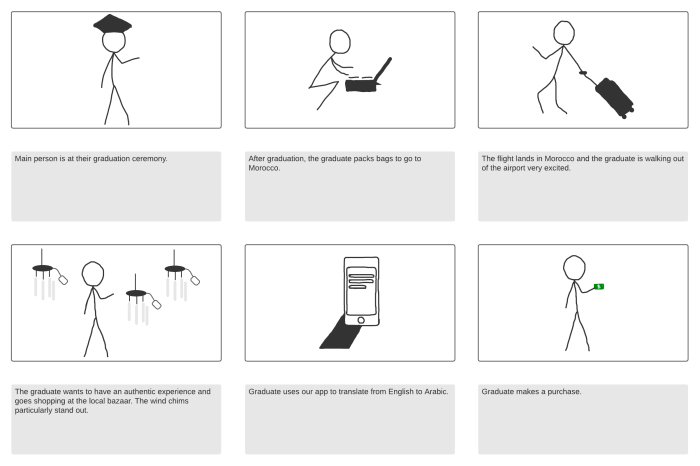
Storyboarding is a visual process, but it begins with a solid foundation in planning. Before you even pick up your pencil, you need a clear understanding of the scene you’re trying to depict. This involves brainstorming and outlining, allowing you to structure your storyboard effectively.
This section guides you through the step-by-step process of creating your first storyboard, from initial concept to final panel. We’ll cover brainstorming and outlining techniques, practical sketching methods, and effective visual representation of key elements like dialogue, action, and camera angles. Finally, we’ll walk through a simple example to solidify your understanding.
Brainstorming and Outlining a Scene
Before starting to sketch, it’s crucial to have a clear understanding of your scene. Brainstorming helps generate ideas, while outlining provides a structured approach. Brainstorming can involve freewriting, mind-mapping, or simply jotting down key moments, characters, and emotions. Outlining, on the other hand, creates a sequential order of events, ensuring a logical flow within your storyboard. For instance, if your scene involves a character discovering a hidden object, you might brainstorm ideas like the character’s motivation, the location of the object, and the character’s reaction. Your Artikel could then break down the scene into distinct stages: the character’s approach, the moment of discovery, and the subsequent reaction. This organized approach prevents confusion and ensures a cohesive narrative.
Sketching Techniques for Storyboard Panels
Effective storyboarding doesn’t require artistic mastery. The goal is clear communication, not artistic perfection. Use simple shapes and lines to represent characters and objects. Focus on conveying the essential action and composition of each shot. Quick sketches are sufficient; detailed drawings are unnecessary. Experiment with different sketching styles to find one that works best for you. Consider using light pencil strokes for initial sketches, allowing for easy corrections. Remember, your storyboard is a working document, not a finished artwork.
Visually Representing Dialogue, Action, and Camera Angles
Your storyboard panels should clearly communicate dialogue, action, and camera angles. Dialogue can be represented using speech bubbles or captions directly within the panel. Action is shown through character poses and visual cues. For example, a character running can be depicted with blurred lines or motion lines. Camera angles are indicated using simple notations, such as “CU” for close-up, “MS” for medium shot, or “LS” for long shot. These notations are often placed in the top corner of each panel. Consistency in your notation is key for clear understanding.
Example Storyboard: Discovering a Hidden Object
Let’s create a storyboard for a short scene where a character discovers a hidden object in an old chest.
- Panel 1: Wide shot. A character, ANNA, approaches an antique wooden chest in a dimly lit attic. Camera angle: Wide shot (WS).
- Panel 2: Medium shot. Anna kneels beside the chest, her expression curious. Camera angle: Medium shot (MS).
- Panel 3: Close-up. Anna’s hands cautiously open the chest. Camera angle: Close-up (CU).
- Panel 4: Medium shot. Anna gasps, her eyes wide with surprise as she sees a jeweled necklace inside. Camera angle: Medium shot (MS). Speech bubble: “Wow!”
- Panel 5: Close-up. Anna picks up the necklace, examining it closely. Camera angle: Close-up (CU).
Enhancing Your Storyboards
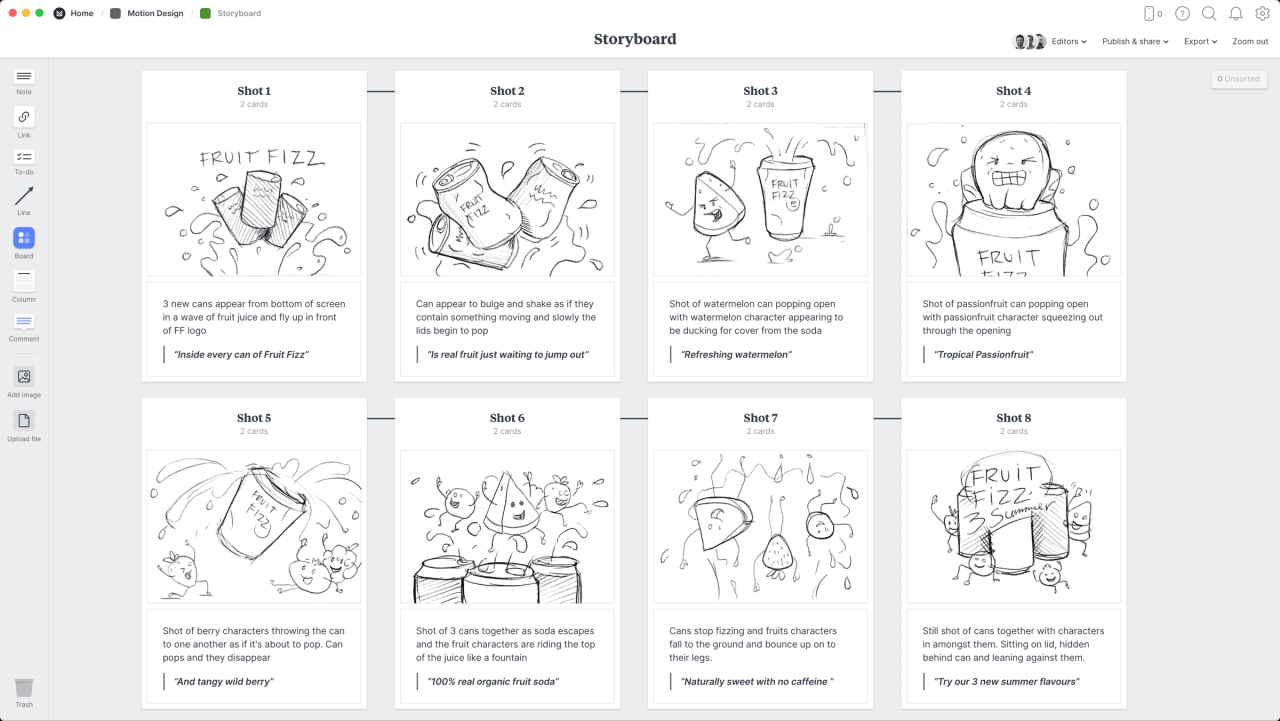
Now that you’ve created your first storyboard, let’s explore techniques to elevate your work from a simple sequence of images to a compelling visual narrative. This section focuses on refining your storytelling skills through advanced visual techniques and a deeper understanding of narrative flow. Mastering these techniques will significantly improve the impact and clarity of your storyboards.
Visual storytelling is paramount; it’s the art of communicating a narrative through images alone, allowing the viewer to experience the story directly. Effective visual storytelling goes beyond simply depicting actions; it conveys emotions, builds suspense, and establishes atmosphere, all without relying on words. A well-crafted storyboard guides the viewer’s eye, creating a powerful emotional connection with the narrative. The viewer’s understanding and engagement are directly influenced by the visual clarity and emotional resonance of the storyboard.
Sound Effects and Transitions Representation
Storyboards don’t just show what happens; they also suggest how it happens. Effectively depicting sound and transitions is crucial for conveying the intended mood and pacing. There are several methods for achieving this. Simple text annotations within panels can indicate sound effects (e.g., “BOOM!”, “WHISTLE,” “SILENCE”). Alternatively, visual cues can be used: a shattered glass panel might suggest the sound of breaking glass, while a blurred image could imply rapid movement. Transitions can be indicated through panel layouts. A quick succession of small panels can suggest rapid editing, while a single large panel with a slow zoom effect might indicate a lingering shot. Consider the impact of each method—simple text is efficient, while visual cues add richness and immersion.
Mood and Atmosphere Creation Through Visual Cues
Setting the mood is essential for any story. Storyboards achieve this through careful manipulation of visual elements. Lighting plays a crucial role: dark, shadowy panels create suspense, while bright, sunny panels suggest happiness or hope. Color palettes are equally important; muted tones might suggest sadness or loneliness, while vibrant colors can evoke excitement or joy. Consider the use of perspective and composition. Low angles can make a character appear powerful, while high angles might make them seem vulnerable. The use of specific objects (e.g., a wilted flower, a stormy sky) can also contribute to the overall mood.
Narrative Flow and Panel Sequencing
Organizing your storyboard panels into a cohesive narrative is key to its effectiveness. The sequence of panels dictates the pace and rhythm of the story. Consider using a variety of panel sizes and layouts to create visual interest and emphasize key moments. A series of small, quick panels might represent rapid action, while a single large panel could focus attention on a significant moment. Camera angles are essential for guiding the viewer’s perspective and shaping their emotional response. A low-angle shot can create a sense of power, while a high-angle shot might suggest vulnerability. The careful selection and sequencing of camera angles can significantly enhance the impact of the story. For instance, a sequence might start with an establishing shot (wide angle), move to a medium shot focusing on a character’s reaction, and then close in on a specific detail, building tension.
Ending Remarks
Mastering storyboarding isn’t about complex techniques, but rather a clear understanding of visual communication and effective planning. This guide has equipped you with the foundational knowledge and practical steps to confidently create compelling storyboards for any project. By following these five easy steps, you can transform your ideas into dynamic visuals, ensuring a cohesive and engaging narrative that captivates your audience. Remember to practice regularly and experiment with different styles to find your unique voice as a visual storyteller.