Unlock your visual storytelling potential with this guide to storyboarding. We’ll explore the fundamentals, from basic layouts to advanced techniques, empowering you to craft compelling narratives through visual sequences. Learn how to effectively communicate your ideas, regardless of your chosen medium – be it film, animation, or even advertising.
This exploration delves into five key principles for effective storyboarding, guiding you through the process of creating clear, engaging visuals. We’ll cover essential elements such as camera angles, character design, and the use of visual metaphors to elevate your storytelling abilities. Prepare to transform your ideas into captivating visual narratives.
Understanding the Fundamentals of Storyboarding
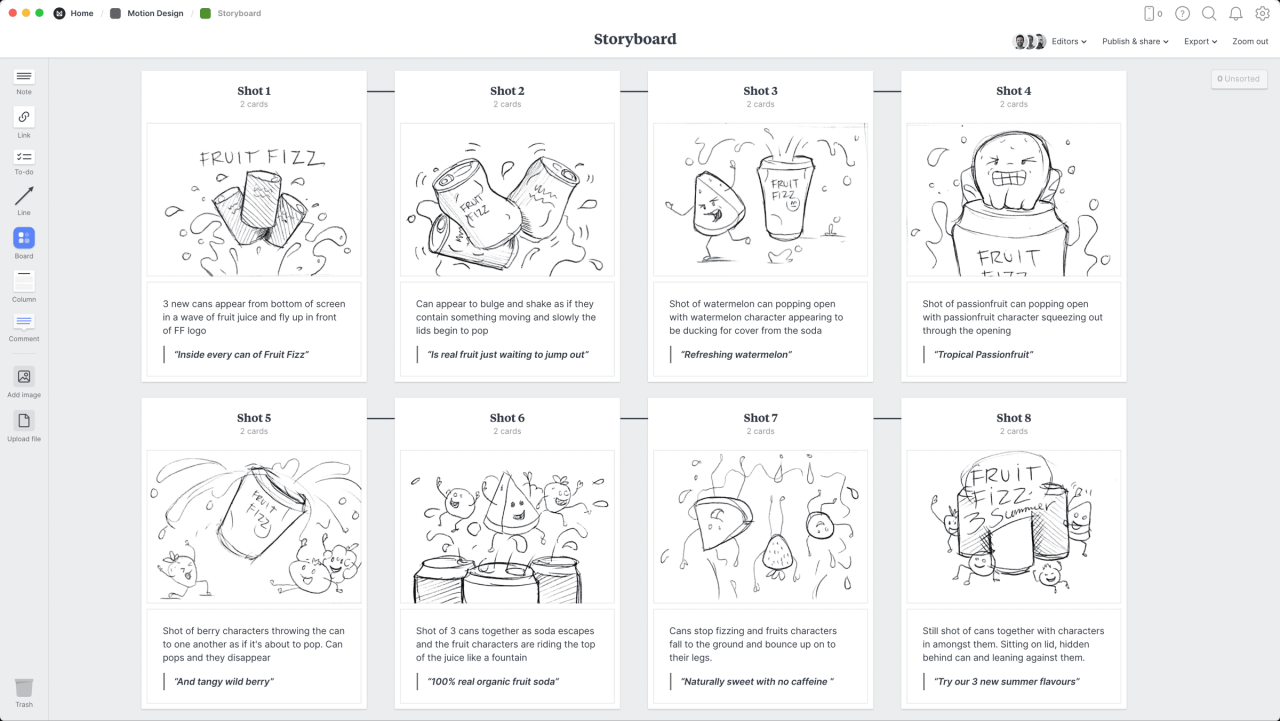
Storyboarding is a crucial pre-production process in filmmaking and animation, serving as a visual roadmap for the final product. It allows creators to plan shots, visualize the narrative flow, and communicate their vision effectively to the team before committing to expensive filming or animation processes. Essentially, it’s a blueprint for your visual story.
Storyboarding bridges the gap between the script and the finished product, providing a tangible representation of the story’s pacing, composition, and overall aesthetic. This collaborative tool ensures everyone involved—directors, animators, cinematographers, and editors—is on the same page, minimizing potential misunderstandings and costly revisions later on.
Creating a Basic Storyboard: A Step-by-Step Guide
The process of creating a storyboard, while seemingly simple, requires careful planning and execution. Following a structured approach ensures consistency and clarity throughout the process.
- Script Breakdown: Begin by thoroughly reading and understanding the script. Identify key scenes, actions, and dialogue crucial to the narrative. Note the emotional tone and intended impact of each scene.
- Thumbnail Sketches: Create quick, rough sketches for each scene. These thumbnails don’t need to be detailed; focus on capturing the essential composition and action. Consider camera angles, character placement, and key visual elements.
- Panel Layout: Organize your thumbnails into panels, arranging them in the sequence of the story. This provides a visual representation of the narrative flow and pacing.
- Refining Sketches: Once the sequence is finalized, refine your thumbnails into more detailed sketches. Add more detail to characters, backgrounds, and action, ensuring consistency in style and perspective.
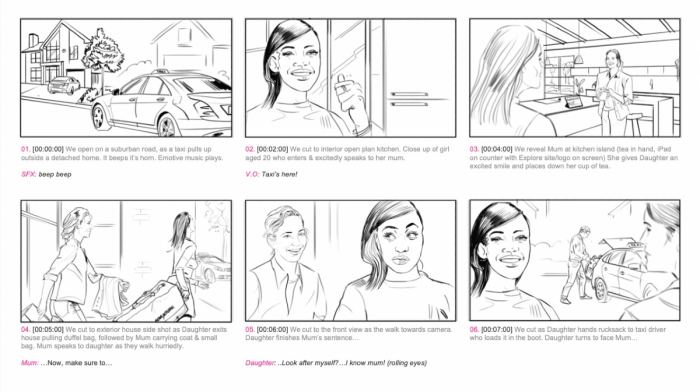
- Adding Dialogue and Notes: Include relevant dialogue, sound effects, and any directorial notes directly on the panels. This ensures that all aspects of the scene are accounted for.
Storyboard Layouts and Applications
Different storyboard layouts cater to specific needs and styles. A common layout uses a single panel per shot, suitable for simple narratives. More complex narratives might use multiple panels per shot to show different aspects of a single action or to emphasize a particular moment.
For example, a film storyboard might utilize a wider panel to showcase a sweeping landscape, while a panel with multiple smaller boxes might be used to illustrate a fast-paced action sequence in animation. Similarly, a storyboard for a commercial might utilize a more concise layout, focusing on key visual moments that communicate the product’s message effectively.
Designing a Storyboard Template for Beginners
A simple template can greatly aid in the creation of a storyboard. A beginner’s template might consist of a series of rectangular boxes, each representing a single shot or panel. Each box should be large enough to accommodate a sketch and space for notes and dialogue. The template could also include space for scene numbers, shot descriptions, and any relevant technical information. Consider using a consistent size and shape for all panels to maintain visual uniformity. A grid-based system can help with consistent panel sizing and organization.
Storyboarding for Film vs. Animation
While the core principles remain the same, there are key differences between storyboarding for film and animation. Film storyboards often focus on camera angles, movement, and composition, as these elements are directly translated to the final product. Animation storyboards, on the other hand, need to detail character animation, expressions, and the overall flow of movement, often including multiple panels for a single second of screen time. Film storyboards might focus more on setting and character placement, while animation storyboards prioritize the detailed actions and expressions of characters.
Mastering the Five Key Principles of Effective Storyboarding

Storyboarding is more than just drawing pictures; it’s a powerful visual language for crafting compelling narratives. Mastering its key principles elevates your storyboards from simple sketches to dynamic blueprints for filmmaking, animation, or even interactive design. This section delves into five crucial elements that transform basic storyboards into effective communication tools.
Clear Visual Storytelling
Effective storyboards communicate the narrative clearly and concisely through visuals alone. Each panel should advance the story, revealing key actions, character interactions, and environmental details. Redundancy should be avoided. For example, instead of showing multiple panels of a character walking down a hallway, a single panel depicting the character at the hallway’s end, with a subtle visual cue indicating the distance traveled (e.g., slightly blurred background), is more impactful. Another example would be showing a character’s reaction to a surprising event through a single, impactful panel instead of multiple panels showing the event itself and then the reaction separately. The goal is to show, not tell, the story visually.
Camera Angles and Composition
Camera angles and composition are vital in shaping the viewer’s perception and emotional response. High angles can portray vulnerability or insignificance, while low angles can suggest power or dominance. A shot framed tightly on a character’s face emphasizes emotion, whereas a wide shot establishes setting and context. Consider the rule of thirds, leading lines, and other compositional techniques to create visually engaging and balanced panels. For instance, a crucial conversation between two characters could be effectively depicted using an over-the-shoulder shot in one panel, followed by a close-up on one character’s reaction in the next, emphasizing their emotional response.
Character Design and Expression
Character design and expression are paramount in conveying personality, emotion, and narrative significance. Even simple line drawings can communicate a wealth of information. Consider the character’s posture, facial features, and clothing to reflect their inner state and role within the story. A character’s slumped posture and downturned eyes might convey sadness, while a confident stance and determined expression would indicate strength. Consistent character design across the storyboard ensures visual coherence and helps viewers connect with the characters more easily.
Visual Metaphors and Symbolism
Visual metaphors and symbolism enrich the narrative by adding layers of meaning beyond the literal. A darkened room might symbolize despair, while a bright, open space could represent hope. A recurring symbol, such as a specific object or color, can add thematic depth and enhance audience engagement. For example, a recurring image of a wilting flower throughout a storyboard could symbolize the deterioration of a relationship. Another example would be using a bird in a cage to represent feelings of confinement and lack of freedom. The effective use of symbolism requires careful consideration and consistent application throughout the storyboard.
Comparative Analysis of Storytelling Techniques
Different storytelling techniques, such as linear versus non-linear narratives, can be effectively compared using storyboards. A linear storyboard progresses sequentially, panel by panel, while a non-linear storyboard might jump between timelines or perspectives. A storyboard illustrating a flashback sequence would visibly differ from one depicting a continuous, chronological narrative. Comparing these side-by-side reveals the strengths and weaknesses of each approach in terms of clarity, pacing, and audience engagement. This comparative analysis helps storyboard artists understand how different techniques affect the storytelling and choose the most appropriate method for their specific narrative.
Applying Storyboarding Techniques to Different Projects

Storyboarding, while fundamentally the same process across various media, adapts its approach based on the specific needs and constraints of each platform. Understanding these nuances allows for more effective communication and a smoother production process. This section explores how storyboarding techniques translate to different projects and genres.
Storyboarding’s versatility extends across film, animation, video games, and advertising, each requiring unique considerations. In film, storyboards serve as a visual blueprint for the director and cinematographer, detailing camera angles, movement, and actor positioning. Animation relies heavily on storyboards to plan character animation, scene transitions, and overall pacing. Video game development utilizes storyboards to map out gameplay sequences, user interface interactions, and cutscenes. Finally, in advertising, storyboards are crucial for visualizing concise narratives that effectively communicate a product or service’s value proposition.
Storyboarding Across Different Media
Film storyboards typically focus on camera angles, shot composition, and actor blocking. A film storyboard might depict a wide shot establishing a location, followed by a medium shot showing a character’s reaction, and finally a close-up emphasizing a key detail. In animation, the storyboard would incorporate character designs, expressions, and detailed action sequences, focusing on the flow and timing of the animation. Video game storyboards, on the other hand, would illustrate gameplay mechanics, character interactions, and user interface elements, often incorporating annotations to specify player controls and actions. Advertising storyboards prioritize clear communication of the product or service’s benefits, often using concise visuals and impactful imagery.
Genre-Specific Storyboarding Approaches
The stylistic choices in a storyboard drastically change depending on the genre. A comedy storyboard might utilize exaggerated expressions and dynamic camera movements to enhance humor. A drama storyboard would focus on subtle emotional cues and carefully composed shots to convey character feelings. A horror storyboard would utilize dark lighting, unsettling imagery, and suspenseful camera angles to build tension and fear. The pacing and visual language are crucial elements in defining the genre’s visual identity. For example, a fast-paced action scene might require many more panels than a slow-burn suspense scene.
Example Storyboard: A Short Horror Scene
Let’s imagine a short horror scene: A lone figure walks down a dark, deserted street at night. Panel 1: A wide shot of a dimly lit street, rain falling. Panel 2: A medium shot of the figure, their face obscured by shadow, walking quickly. Panel 3: A close-up on a puddle reflecting a distorted image of the figure. Panel 4: A low-angle shot looking up at a shadowy figure emerging from an alleyway. Panel 5: A close-up on the figure’s terrified face. This sequence uses a combination of wide and close-up shots, shadow play, and perspective to build suspense and fear.
Incorporating Sound and Music into Storyboard Planning
Sound and music are integral to storytelling. Storyboards should incorporate annotations indicating key sound effects and musical cues. For the horror scene example, annotations might include: Panel 1: “Sound of rain, distant footsteps”; Panel 3: “Distorted reflection sound effect”; Panel 4: “Ominous music swells”; Panel 5: “Screaming sound effect.” This integration helps visualize the overall atmosphere and enhances the emotional impact of the scene.
Storyboard for a Simple Commercial
Let’s create a storyboard for a commercial advertising a new type of noise-canceling headphones. Panel 1: A bustling city street, sounds of traffic and crowds. Panel 2: A person putting on the headphones. Panel 3: The person’s face relaxes, a peaceful expression. Panel 4: Close-up of the headphones with text overlay: “Silence the City.” Panel 5: Person smiling, enjoying music, text overlay: “[Brand Name] Headphones.” This storyboard uses visual contrast to highlight the product’s benefit and uses text overlays to reinforce the brand message. The sound design would contrast the chaotic city sounds with the serene soundscape experienced with the headphones.
Final Summary
Mastering storyboarding opens doors to a world of creative possibilities. By understanding the fundamentals and applying these five key principles, you’ll confidently translate your concepts into dynamic visual sequences. Whether you’re crafting a short film, an animated sequence, or a marketing campaign, this foundational skill will elevate your storytelling to new heights. Embrace the power of visual narrative and watch your ideas come to life.