Storyboarding, a technique traditionally used in filmmaking, offers a surprisingly effective approach to project planning. By visually representing project timelines, user experiences, and communication strategies, storyboards provide a clear, concise, and collaborative method for navigating the complexities of any project. This approach allows for early identification of potential bottlenecks, facilitates better communication among team members, and ultimately leads to a more streamlined and successful project outcome.
This exploration delves into seven distinct ways storyboards can be leveraged throughout the project lifecycle, from initial conception to final delivery. We’ll examine how storyboards aid in visualizing timelines, enhancing user experience design, and fostering effective communication and collaboration. Each method is illustrated with practical examples and considerations for successful implementation.
Storyboarding for Project Timeline Visualization
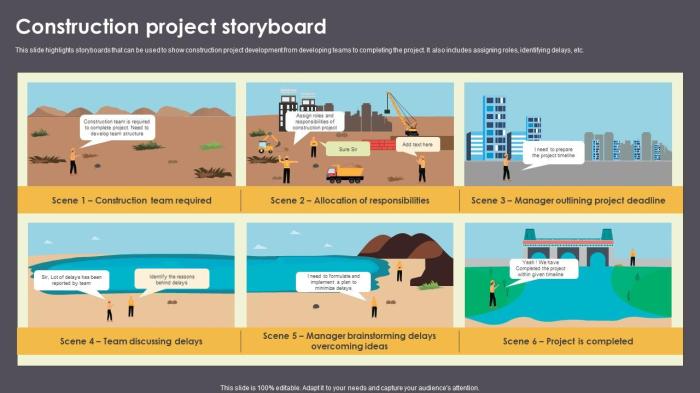
Storyboards, traditionally used in filmmaking, offer a surprisingly effective method for visualizing project timelines and workflows. By representing tasks as visual elements, storyboards facilitate a clearer understanding of project sequencing, dependencies, and potential roadblocks, ultimately improving project management and communication. This approach allows for a more intuitive grasp of the project’s overall progress and potential challenges.
Project Timeline Visualization Using a Table
A simple yet powerful way to use a storyboard for project timeline visualization is through a table. This allows for a clear and concise representation of key milestones and deadlines. Imagine a project with several phases, each containing multiple tasks. The following table example demonstrates this concept:
| Task | Start Date | End Date | Status |
|---|---|---|---|
| Website Design | 2024-03-01 | 2024-03-15 | Completed |
| Content Creation | 2024-03-15 | 2024-03-29 | In Progress |
| Development | 2024-03-29 | 2024-04-12 | Pending |
| Testing | 2024-04-12 | 2024-04-19 | Scheduled |
| Deployment | 2024-04-19 | 2024-04-26 | Not Started |
This table provides a snapshot of the project’s timeline, allowing for easy identification of tasks that are overdue, in progress, or yet to begin. The visual representation aids in understanding the project’s progress at a glance.
Workflow Visualization with Visual Cues
A storyboard can also illustrate the project’s workflow, showing the dependencies between different tasks. This is achieved using visual cues such as arrows, different colored boxes, or connecting lines to represent the flow and relationships between tasks. For example, a green box might represent a completed task, a yellow box a task in progress, and a red box a delayed task. Arrows could indicate the sequence of tasks, with a dotted line representing a conditional dependency (Task B can only begin if Task A is 80% complete). A legend would clarify the meaning of each visual cue.
Identifying Potential Bottlenecks and Delays
Storyboarding helps proactively identify potential bottlenecks or delays. By visually representing task dependencies and durations, potential conflicts become apparent. For instance, if one task has a significantly longer duration than anticipated, and it precedes multiple other tasks, it becomes clear that this task could cause a delay in the entire project. Similarly, if multiple tasks depend on the completion of a single preceding task, it highlights a potential bottleneck. Analyzing the storyboard can reveal these issues before they become major problems, allowing for proactive mitigation strategies. For example, identifying a potential bottleneck in the content creation phase might prompt the team to allocate additional resources or adjust the timeline to prevent delays in subsequent phases.
Storyboarding for User Experience (UX) Design in Project Planning
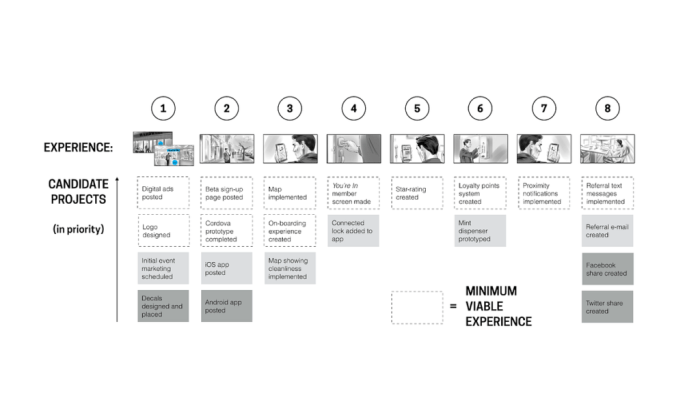
Storyboarding is a powerful tool for visualizing and improving the user experience (UX) during project planning. By creating visual representations of user interactions, designers can identify potential usability issues and refine the design before development begins, saving time and resources. This approach allows for iterative improvements based on feedback and ensures a more user-friendly final product. This section will explore how storyboarding can be used to enhance UX design within the project planning phase.
Storyboarding a User Journey
A storyboard depicting a user’s journey through a key feature provides a clear understanding of the user’s interaction with the system. This allows for the identification of potential pain points and areas for improvement. The following storyboard illustrates a user adding an item to a shopping cart on an e-commerce website.
- User Action: Navigates to the product page.
- System Response: Displays product details, including images, description, and price.
- User Action: Selects desired quantity.
- System Response: Updates the total price displayed.
- User Action: Clicks “Add to Cart” button.
- System Response: Displays a success message and updates the cart icon with the number of items.
- User Action: Views the shopping cart.
- System Response: Displays a summary of the items in the cart, with options to proceed to checkout or continue shopping.
Storyboarding for Different User Personas
Understanding how different user personas interact with the project is crucial for designing an inclusive and effective UX. The following table compares and contrasts the experiences of two personas: a tech-savvy young adult and an elderly user, interacting with the same e-commerce website’s checkout process.
| Persona | Interaction |
|---|---|
| Tech-savvy Young Adult | Quickly navigates the checkout process, utilizing autofill features and understanding all options presented. Completes the purchase efficiently. |
| Elderly User | May find the checkout process more challenging, requiring larger font sizes and clear, concise instructions. May need assistance with certain steps, such as password entry or payment options. |
Storyboarding Potential Usability Issues
Storyboarding can highlight potential usability problems. By visualizing these issues, designers can proactively address them. The following storyboard depicts a scenario where a user is unable to find a specific product using the website’s search function.
The search bar is not prominent enough. Users may overlook it, leading to frustration.
Search results are not clear and concise, and lack relevant filtering options. This makes it difficult for users to find the specific product they are looking for.
The error message displayed when a product is not found is not helpful and doesn’t provide guidance on how to improve the search.
Storyboarding for Communication and Collaboration in Project Planning
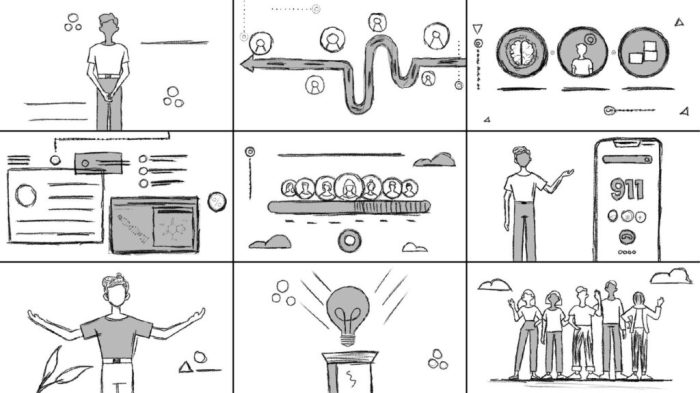
Storyboards aren’t just for visualizing timelines and user experiences; they’re powerful tools for improving communication and collaboration throughout the project lifecycle. By visually mapping out communication strategies and feedback loops, project teams can proactively address potential roadblocks and foster a more unified approach. This visual approach enhances clarity and understanding, leading to more efficient teamwork and a smoother project execution.
Storyboarding offers a unique advantage in facilitating clear communication and efficient collaboration among project stakeholders. It allows for a shared understanding of roles, responsibilities, and communication pathways, minimizing misunderstandings and ensuring everyone is on the same page. This proactive approach helps prevent communication breakdowns and fosters a collaborative environment where everyone feels informed and involved.
Communication Plan Visualization
A storyboard can effectively Artikel the project’s communication plan, identifying key stakeholders and their preferred communication methods. This visual representation clarifies the communication flow, ensuring timely and effective information dissemination. The following table provides a sample storyboard illustrating this concept:
| Stakeholder | Communication Method | Frequency |
|---|---|---|
| Project Manager | Email, Project Management Software | Daily |
| Development Team | Daily Stand-up Meetings, Project Management Software | Daily |
| Client | Weekly Progress Reports, Video Conferences | Weekly |
| Marketing Team | Email, Project Management Software | Bi-weekly |
Feedback Gathering and Incorporation
Storyboarding can visually represent the process of gathering and incorporating feedback into the project plan. Each frame could depict a step in the process, from soliciting feedback through surveys or meetings to analyzing the feedback and making necessary adjustments to the project timeline or deliverables. For example, a storyboard could show a frame depicting a client feedback meeting, followed by a frame showing the project team analyzing the feedback, and finally, a frame showing the updated project plan reflecting the incorporated changes. This visual representation makes the feedback process transparent and ensures everyone understands how feedback influences the project’s direction.
Facilitating Brainstorming Sessions
Storyboards provide a visual framework for brainstorming sessions, encouraging creative idea generation. By visually mapping out different scenarios and potential solutions, teams can explore various possibilities and identify innovative approaches to challenges. The visual nature of the storyboard facilitates a more dynamic and engaging brainstorming session, allowing for easier idea sharing and collaboration.
Potential ideas generated through a storyboard session could include:
- Streamlining project workflows to improve efficiency.
- Implementing new technologies to enhance project deliverables.
- Identifying potential risks and developing mitigation strategies.
- Developing alternative solutions to address project challenges.
- Improving communication channels to enhance stakeholder engagement.
Last Word
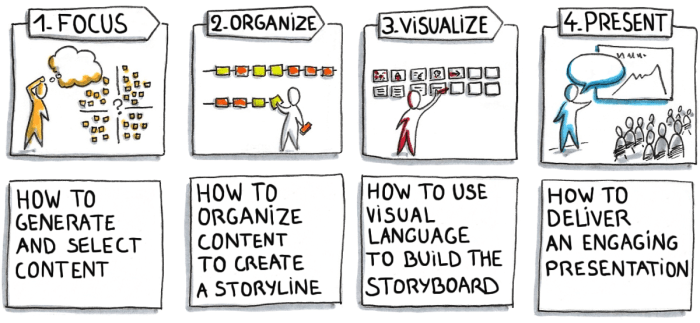
In conclusion, integrating storyboarding into your project planning process offers significant advantages. By visualizing key aspects of your project, from timelines and user journeys to communication strategies, storyboards provide a powerful tool for improved clarity, enhanced collaboration, and ultimately, a higher likelihood of project success. The ability to identify potential issues early, foster better communication, and generate innovative solutions makes storyboarding an invaluable asset for project managers and teams alike. Embrace the visual power of storyboarding to transform your project planning and execution.