Rapid prototyping is crucial for efficient project development across various industries. Storyboards, visual representations of a sequence of events, streamline this process by allowing for quick iteration and feedback. This guide explores five top storyboard templates designed to accelerate your prototyping workflow, examining their key features and applications in fields like film, game development, and software design. We’ll delve into the advantages of using pre-designed templates versus creating your own, highlighting best practices for effective visual communication.
From comparing horizontal versus vertical layouts and single-panel versus multi-panel designs, to understanding how specific features enhance feedback cycles, we aim to equip you with the knowledge to choose and utilize the perfect template for your next project. We will also discuss common pitfalls and provide solutions to ensure a smooth and productive prototyping experience.
Top 5 Storyboard Template Features for Quick Prototyping
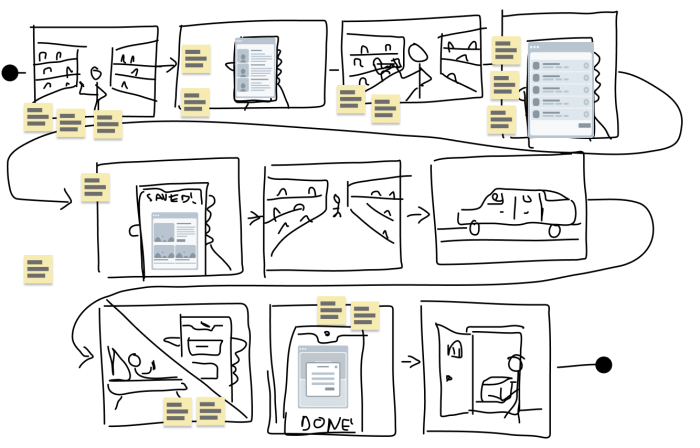
Effective storyboard templates significantly accelerate the prototyping process by streamlining visualization and communication. Choosing the right template can drastically reduce the time spent on revisions and feedback loops, leading to faster product development cycles. The key is selecting a template that balances visual clarity with ease of use and adaptability to various project needs.
Key Features of Excellent Storyboard Templates for Rapid Prototyping
Five key features distinguish excellent storyboard templates for rapid prototyping. These features enhance collaboration, improve visual communication, and ultimately facilitate faster iteration cycles. A well-designed template should prioritize clarity, flexibility, and ease of use, enabling designers and stakeholders to quickly grasp the project’s essence.
Firstly, clear panel layouts are crucial. The template should provide a consistent and intuitive structure for presenting scenes, ensuring visual flow and preventing confusion. Secondly, pre-designed elements, such as character templates, props, and background options, significantly speed up the creation process. Thirdly, space for notes and annotations is essential for adding context, details, and revisions, fostering efficient collaboration and clear communication. Fourthly, scalability and flexibility are paramount; the template should adapt to different project sizes and complexities, from short animations to extensive interactive experiences. Finally, digital compatibility is a must for easy sharing, collaboration, and iteration through digital tools. These features collectively ensure a smooth and efficient prototyping workflow.
Comparison of Template Layouts
Horizontal and vertical layouts each offer unique advantages for rapid prototyping. Horizontal layouts, resembling comic strips, are ideal for showcasing sequential actions and narratives. They are easy to follow and provide a strong sense of visual flow. Vertical layouts, on the other hand, are better suited for illustrating hierarchical structures or processes, allowing for a more detailed breakdown of each step. Single-panel templates are best for quickly sketching individual scenes or ideas, while multi-panel templates are better suited for complex narratives and interactive flows. The choice between single and multi-panel layouts often depends on the complexity of the project and the level of detail required. For example, a simple app onboarding flow might benefit from a single-panel approach, while a complex game scene might require a multi-panel layout to depict various character interactions and actions.
Template Features Facilitating Faster Iteration and Feedback Cycles
Specific template features directly impact iteration speed. Pre-populated elements significantly reduce drawing time, while ample space for notes and annotations simplifies feedback integration. Digital compatibility ensures seamless sharing and collaborative editing, accelerating the review process. For instance, a template with readily available character poses allows designers to focus on scene composition rather than drawing each character from scratch. Similarly, a digital template that allows for easy annotation directly within the storyboard itself facilitates efficient feedback incorporation, eliminating the need for separate documents or emails.
Comparison of Five Storyboard Templates
| Template Name | Strengths | Weaknesses | Best Suited For |
|---|---|---|---|
| Template A (e.g., simple, grid-based) | Easy to use, clear layout, quick sketching | Limited customization, lacks pre-designed elements | Rapid brainstorming, initial concept visualization |
| Template B (e.g., character-focused) | Abundant character assets, diverse poses | Less versatile for non-character-driven projects | Animated projects, character-heavy narratives |
| Template C (e.g., scene-focused) | Pre-designed backgrounds and props, detailed settings | Steeper learning curve, less flexible | Projects with complex environments, detailed scenes |
| Template D (e.g., interactive flow-chart style) | Excellent for user flows and interactive designs | Less suitable for linear narratives | App design, website prototyping, interactive experiences |
| Template E (e.g., highly customizable, digital) | Maximum flexibility, digital collaboration features | Steeper learning curve, may require more technical skills | Complex projects requiring high level of customization and collaboration |
Storyboard Templates and Their Applications in Various Industries
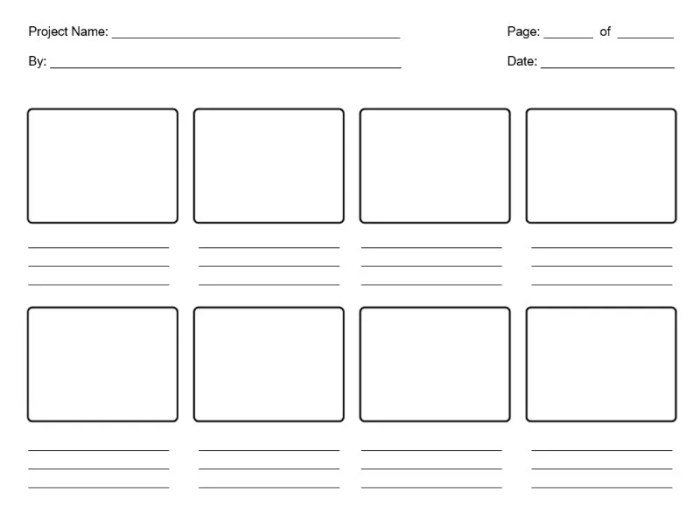
Storyboard templates are invaluable tools across diverse creative industries, streamlining the pre-production process and facilitating clear communication among team members. Their versatility allows for adaptation to specific project needs, enhancing efficiency and reducing potential errors during production. The consistent structure provided by a template ensures all crucial elements are considered, from character design to scene transitions, regardless of the industry.
Storyboard templates find extensive application in film production, game development, and software design, each leveraging the template’s unique strengths in different ways. Their use drastically reduces ambiguity and promotes a shared understanding of the final product’s vision, saving time and resources throughout the entire development lifecycle.
Storyboard Template Applications in Film Production
In film production, storyboard templates are crucial for visualizing the shots, camera angles, and scene composition before filming begins. A director might use a template featuring panels designed for detailed shot descriptions, including camera movement notations (e.g., “zoom in,” “pan left”), character actions, and dialogue. This allows the director to communicate their vision effectively to the cinematographer, actors, and other crew members. Using a template with pre-defined spaces for these elements ensures consistency and avoids overlooking important details. For example, a template specifically designed for action sequences might include larger panels to accommodate complex movement and multiple characters, while a template for dialogue-heavy scenes might emphasize speech bubbles and character expressions. The benefits include reduced on-set confusion, better resource allocation, and ultimately, a more efficient and cost-effective production process.
Storyboard Template Applications in Game Development
Game developers utilize storyboard templates to plan the game’s narrative, level design, and user interface (UI). A template designed for game development might incorporate elements like character sprites, environment sketches, and UI mockups within each panel. This is particularly useful in planning cutscenes or interactive sequences. For example, a template tailored for a platformer game could feature panels showing the character’s movements, obstacles, and collectible items, ensuring a smooth and engaging gameplay experience. Similarly, a template for a role-playing game (RPG) could focus on depicting character interactions, dialogue trees, and environmental details relevant to the story’s progression. The advantages of using a template include enhanced team collaboration, improved level design consistency, and easier identification of potential gameplay issues early in development.
Storyboard Template Applications in Software Design
In software design, storyboard templates are used to map out the user interface (UI) and user experience (UX) flow. Here, templates typically focus on depicting screen layouts, user interactions, and navigation paths. A template designed for software might feature panels showing different screens and how users transition between them. For example, a template used for designing a mobile app might include panels showcasing the app’s home screen, settings menu, and various interactive elements. The use of pre-designed templates ensures a consistent look and feel across the application and allows designers to focus on the usability and functionality of the software. This results in a more intuitive and user-friendly product, ultimately leading to increased user satisfaction.
Advantages of Pre-designed Templates versus Custom Templates
Using pre-designed storyboard templates offers several advantages over creating custom templates from scratch. Pre-designed templates provide a ready-made structure, saving time and effort. They often include pre-formatted elements, such as character templates and scene backgrounds, streamlining the design process. Furthermore, pre-designed templates often ensure consistency in style and format, improving the overall visual appeal and clarity of the storyboard. However, custom templates allow for greater flexibility and customization, offering a tailored solution for specific project requirements. The choice between using a pre-designed or custom template depends on the project’s complexity, time constraints, and budget.
Workflow Differences: Template vs. No Template
The use of a storyboard template significantly alters the workflow compared to creating a storyboard without a template. This is illustrated in the following points:
- Time Efficiency: Using a template significantly reduces the time spent on formatting and organizing the storyboard, allowing designers to focus on the creative aspects of the project.
- Consistency: Templates ensure consistency in style, layout, and presentation, making the storyboard easier to understand and follow for all stakeholders.
Creating Effective Storyboards with Rapid Prototyping Templates
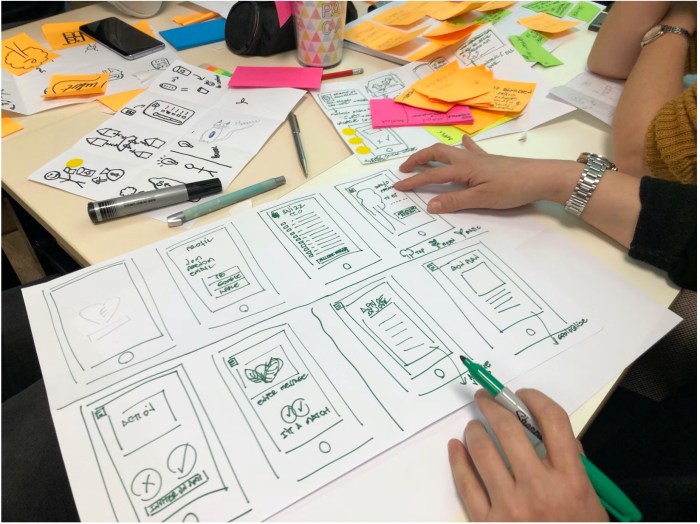
Storyboarding is a crucial step in the rapid prototyping process, allowing for efficient visualization and communication of ideas before significant resources are committed to development. Using pre-designed templates streamlines this process, providing a structured framework for visual storytelling and facilitating collaboration among team members. This section details the process of leveraging storyboard templates for effective rapid prototyping, highlighting best practices and common pitfalls to avoid.
Effective storyboard creation using templates involves a structured approach to visual communication. This ensures clarity and consistency throughout the prototyping process, leading to a more efficient and effective end product. By understanding the key steps and potential challenges, designers can create compelling storyboards that effectively convey their vision.
Steps Involved in Using a Storyboard Template for Rapid Prototyping
Utilizing a storyboard template for rapid prototyping involves a straightforward, iterative process. The process begins with selecting an appropriate template and progresses through sketching, refinement, and feedback integration.
- Template Selection: Choose a template that best suits the project’s needs. Consider factors such as the number of scenes, panel layout, and overall style. Some templates offer space for detailed descriptions, while others focus solely on visual representation. The choice depends on the project’s complexity and the team’s communication preferences.
- Scene Breakdown: Divide the project’s narrative into individual scenes. Each scene should represent a distinct moment or action within the overall story. Consider the key events and interactions that need to be depicted.
- Sketching and Layout: Using the chosen template, sketch out each scene in the designated panels. Focus on clear visual representation of key actions and elements. Keep the sketches simple and easy to understand; detailed artwork is not necessary at this stage.
- Iteration and Refinement: Review the storyboard, identifying areas for improvement. Revise sketches, adjust layouts, and add or remove scenes as needed. This iterative process is key to creating a refined and effective storyboard.
- Feedback Integration: Share the storyboard with stakeholders for feedback. Incorporate suggestions and revisions to ensure the storyboard accurately reflects the project’s vision and addresses potential concerns.
Communicating Ideas and Concepts Through Visual Storytelling
Effective visual storytelling using storyboard templates hinges on clear communication of key ideas and concepts. The visuals should complement the narrative, ensuring a cohesive and understandable message. Careful consideration of composition, character design, and visual cues enhances the effectiveness of the storytelling.
A well-designed storyboard should tell a complete story, even without accompanying text.
The use of consistent visual styles, such as character design and setting representation, ensures continuity and improves overall comprehension. Similarly, the use of clear visual cues, such as arrows or annotations, helps highlight key actions and transitions between scenes. Careful consideration of panel composition, including the use of close-ups, wide shots, and point-of-view perspectives, further enhances the narrative impact.
Common Pitfalls to Avoid When Using Templates for Rapid Prototyping
Several common pitfalls can hinder the effectiveness of storyboard templates in rapid prototyping. These include neglecting the iterative process, focusing excessively on detail, and failing to incorporate feedback. Addressing these issues proactively ensures a smoother and more productive process.
- Insufficient Iteration: Failing to revise and refine the storyboard based on feedback can lead to a final product that does not accurately reflect the project’s goals.
- Overemphasis on Detail: Spending too much time on detailed artwork at the initial stages can slow down the prototyping process. The focus should be on conveying the core narrative efficiently.
- Ignoring Feedback: Failing to incorporate feedback from stakeholders can result in a storyboard that does not meet their expectations or effectively communicate the project’s vision.
- Inconsistent Visual Style: Lack of consistency in character design, setting representation, and overall visual style can create confusion and hinder comprehension.
Step-by-Step Guide on Designing a Storyboard Using a Template
Designing an effective storyboard using a template involves a structured approach, combining visual elements and narrative clarity. The following steps provide a comprehensive guide.
- Define the Narrative: Clearly articulate the story or concept to be conveyed. Artikel the key events and interactions.
- Select a Template: Choose a template that aligns with the project’s needs, considering the number of scenes and desired level of detail.
- Break Down the Story: Divide the narrative into distinct scenes, each representing a specific moment or action.
- Sketch the Scenes: Create simple sketches in each panel, focusing on clear visual representation of key elements.
- Add Dialogue and Descriptions (Optional): Include concise dialogue or descriptions to enhance understanding where necessary.
- Review and Revise: Critically review the storyboard for clarity, consistency, and completeness. Revise as needed.
- Seek Feedback: Share the storyboard with stakeholders and incorporate their feedback.
Closing Notes
Ultimately, selecting the right storyboard template significantly impacts the speed and efficiency of your prototyping process. By understanding the key features, industry applications, and best practices Artikeld in this guide, you can leverage the power of visual storytelling to effectively communicate your ideas and achieve faster iteration cycles. Whether you’re a seasoned professional or just starting out, incorporating a well-chosen template into your workflow can dramatically improve your project development process.