Storyboarding isn’t just for animators; it’s a powerful tool for refining any narrative. This guide explores five key ways storyboards can significantly improve the storytelling feedback process, leading to clearer communication, stronger visuals, and more effective collaboration. We’ll delve into how visual representations can enhance clarity, identify pacing problems, and even resolve plot inconsistencies, ultimately resulting in a more polished and engaging final product.
From clarifying complex dialogue to refining character development and facilitating collaborative feedback sessions, storyboards offer a visual language that transcends words, making the feedback process more intuitive and productive. We will examine practical examples and techniques to help you harness the full potential of storyboards in your storytelling workflow.
Storyboard Feedback for Enhanced Clarity and Structure
Storyboards are invaluable tools not only for visualizing a narrative but also for refining its clarity, structure, and pacing. By using storyboards in the feedback process, creators can identify and address potential problems before they become entrenched in the final product. This allows for more efficient and effective revisions, leading to a stronger, more engaging story.
Storyboards facilitate a clear and concise visual representation of a narrative, making it easier to identify and address issues related to dialogue, pacing, and plot inconsistencies. This visual approach often reveals problems that might be missed in a script alone.
Storyboard Feedback for Improved Dialogue Clarity
Unclear dialogue can significantly hinder a story’s effectiveness. Storyboards provide a visual context that clarifies ambiguous statements and allows for better understanding of character interactions and motivations. The following example demonstrates how a storyboard can be used to improve dialogue clarity.
| Original Storyboard | Revised Storyboard |
|---|---|
| Panel 1: Two characters, ANNA and BEN, face each other. Anna says, “It’s about time.” Speech bubble is small and unclear. Panel 2: Ben looks confused. Panel 3: Anna shrugs. | Panel 1: Close-up on Anna’s determined face. Clear speech bubble: “It’s about time you understood!” Panel 2: Ben’s face shows a dawning realization. Thought bubble above his head: “The missing necklace?”. Panel 3: Anna nods, a subtle smile playing on her lips. |
Storyboard Feedback for Pacing Issues
Pacing is crucial for maintaining audience engagement. A slow pace can lead to boredom, while a fast pace can leave the audience feeling overwhelmed. Storyboards allow for a visual assessment of the pacing by showing the flow of events and the amount of time visually allocated to each scene.
Consider a scene where a character is simply walking down a street. In a poorly paced storyboard, this might take up several panels, slowing the narrative. A revised storyboard could condense this into one panel, or use visual elements to convey the passage of time more efficiently, allowing for a faster pace in the story’s overall progression.
For example, a slow-paced storyboard might show five panels of a character slowly walking down a street, each panel showing virtually identical movement. A revised storyboard could show one panel depicting the character walking down the street, perhaps with background elements indicating distance covered, or a visual element, like a passing car, to suggest the passage of time.
Storyboard Feedback for Plot Holes and Inconsistencies
Storyboards can effectively highlight plot holes or inconsistencies in a narrative. By visualizing the sequence of events, it becomes easier to identify gaps in logic, inconsistencies in character behavior, or unexplained plot points.
| Scene | Problem | Solution |
|---|---|---|
| Character A escapes from a locked room. | No explanation is given for how Character A unlocked the door. | Add a panel showing Character A finding a hidden key, or picking the lock using a hairpin, or discovering the door was unlocked. |
| Character B suddenly has a new car. | There is no prior mention of Character B acquiring the car. | Add a panel showing Character B receiving the car as a gift, buying it, or finding it abandoned. |
| Character C changes their personality drastically without explanation. | The change in personality feels abrupt and unexplained. | Add panels showing events or interactions that could explain the shift in personality, such as a traumatic event or a significant life change. |
Storyboard Feedback for Visual Storytelling and Character Development
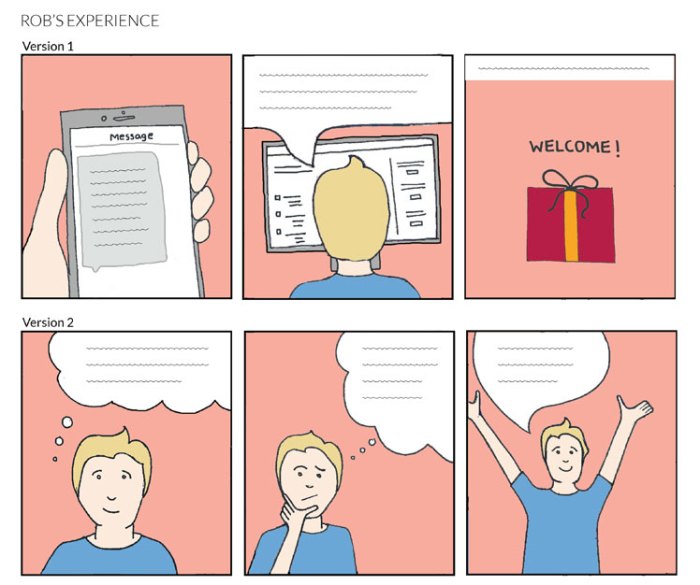
Storyboards are invaluable tools not only for outlining narrative structure but also for refining the visual language of a story and developing compelling characters. Effective feedback on storyboards should consider how visual elements contribute to the emotional impact and character arcs, ensuring a cohesive and engaging visual narrative.
Storyboarding allows for iterative refinement of both the visual storytelling and the character development aspects of a project. By visualizing character interactions and emotional shifts through imagery, creators can gain crucial insights into the effectiveness of their storytelling choices before committing to more expensive production phases.
Visual Metaphors and Emotional States
The following storyboard sequence demonstrates how visual metaphors can effectively convey a character’s emotional state. Imagine a scene where a character, let’s call her Anya, is experiencing intense loneliness.
Panel 1: Anya sits alone in a large, empty room. The room is depicted in muted greys and blues, with shadows stretching long across the floor. Anya is small in the frame, emphasizing her isolation. She is hunched over, her posture mirroring her internal state.
Panel 2: Anya’s reflection in a large mirror is shown. The reflection is faint and distorted, almost translucent, symbolizing her feeling of disconnect from herself and the world.
Panel 3: A single wilting flower sits on a table beside Anya. The flower’s drooping petals directly mirror Anya’s emotional state; her sadness is visually reflected in the dying plant.
Panel 4: Anya looks out a large window. Outside, a vibrant sunset is depicted, a stark contrast to the bleakness of her interior world. This juxtaposition highlights her internal conflict and yearning for something more.
These visual elements – color palette, character placement, symbolic objects – work together to create a powerful visual metaphor for Anya’s loneliness, enhancing the narrative’s emotional impact without relying solely on dialogue or exposition. The use of color and light, particularly the contrast between the cold interior and the warm sunset, intensifies the feeling of isolation and longing.
Character Design Refinement Through Storyboarding
Storyboarding provides a powerful mechanism for refining character design and visual representation. Let’s consider the evolution of a character, let’s call him Marcus, throughout a pivotal scene.
Initially, Marcus is depicted in Panel 1 as a rigidly posed figure in a sharp, formal suit. His expression is stern and unyielding.
Panel 2 shows Marcus beginning to relax his posture slightly. The lines of his suit are less crisp.
Panel 3 shows Marcus removing his jacket, his tie loosened. His expression softens.
Panel 4 shows Marcus completely shedding his formal attire, revealing a more casual and comfortable appearance underneath. His expression is now open and approachable.
* Posture: Starts rigid, becomes progressively more relaxed.
* Clothing: Changes from formal suit to casual attire.
* Facial Expression: Transforms from stern and unyielding to open and approachable.
* Color Palette: The color palette around him subtly shifts from dark and formal to warmer and more inviting.
This visual evolution subtly reflects Marcus’s internal transformation throughout the scene, making his character arc clear and compelling to the viewer.
Comparative Storyboard Approaches
The following demonstrates two different visual approaches to conveying the same pivotal scene: a character, let’s call her Elena, confronting her fear.
Storyboard A: This version focuses on a close-up of Elena’s face, showing her eyes widening with fear. Her hands are clenched tightly, and her breathing is visibly shallow. The color palette is dominated by dark shadows and muted tones, amplifying her fear.
Storyboard B: This version depicts Elena standing at the edge of a cliff, the vast expanse of the landscape emphasizing her vulnerability. The wind whips through her hair, symbolizing her inner turmoil. The vastness of the landscape contrasts with her small figure, visually representing her overwhelming fear.
While both storyboards convey Elena’s fear, Storyboard A is more intimate and focuses on her internal emotional state. Storyboard B uses a broader visual approach, emphasizing her vulnerability within a larger context. The effectiveness of each approach depends on the overall narrative and the desired emotional impact. Storyboard A might be more effective for a character-driven narrative, while Storyboard B might suit a story that emphasizes the character’s relationship with their environment.
Storyboard Feedback for Collaboration and Iteration in Storytelling
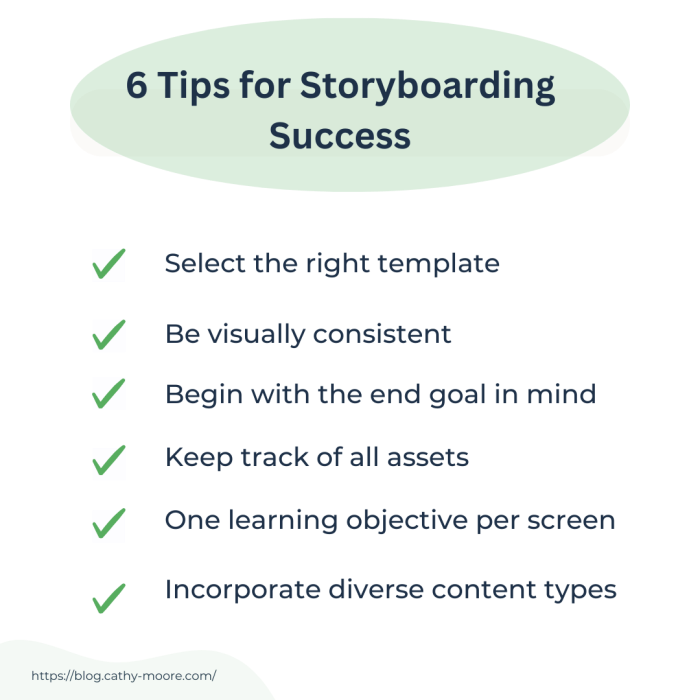
Storyboards are invaluable tools not only for visualizing a narrative but also for fostering collaboration and iterative development within a storytelling team. By providing a shared visual language, storyboards facilitate clear communication, enabling team members to offer constructive feedback and refine the narrative effectively throughout the production process. This shared understanding minimizes misunderstandings and ensures everyone is on the same page, resulting in a more cohesive and compelling final product.
Storyboards facilitate effective feedback sessions by offering a tangible representation of the narrative for discussion and critique. This visual medium transcends language barriers and allows for a more intuitive understanding of the story’s flow, pacing, and emotional impact. Furthermore, the iterative nature of storyboarding allows for easy adjustments and experimentation, leading to a more polished and refined final product.
Comparing and Contrasting Storytelling Perspectives Using Storyboards
The following table demonstrates how different storytelling perspectives can be compared and contrasted using a storyboard. Each scene is viewed from two distinct perspectives, highlighting the varying emotional impact and narrative focus. The comparison column identifies key differences and the overall effect on the story.
| Scene | Perspective A (Protagonist’s POV) | Perspective B (Antagonist’s POV) | Comparison |
|---|---|---|---|
| Character A discovers a hidden treasure map. | Image: Close-up of Character A’s face, eyes wide with excitement, clutching the map. Caption: “Impossible! This is it!” | Image: Character B watching from shadows, a sinister smirk on their face. Caption: “Foolish child. The treasure is mine.” | Perspective A focuses on the protagonist’s joy and anticipation, while Perspective B highlights the antagonist’s malicious intent, setting up the conflict. |
| Character A encounters a dangerous obstacle. | Image: Character A facing a raging river, looking apprehensive but determined. Caption: “I have to cross… somehow.” | Image: Character B observing from a distance, a calculating expression. Caption: “Let the river claim them.” | Perspective A emphasizes the protagonist’s courage and resilience, whereas Perspective B underscores the antagonist’s passive aggression and manipulation of circumstances. |
| Character A reaches the treasure. | Image: Character A triumphantly holding the treasure chest, radiating happiness. Caption: “I did it! Victory is mine!” | Image: Character B emerging from the shadows, furious and enraged. Caption: “You’ll pay for this!” | Perspective A shows the protagonist’s ultimate success, while Perspective B sets up the final confrontation, highlighting the antagonist’s failure and subsequent revenge plot. |
Facilitating Effective Feedback Sessions Using Storyboards
A structured approach to feedback sessions using storyboards ensures constructive criticism and collaborative refinement. The following steps Artikel a productive process:
- Preparation: Distribute the storyboard to all team members in advance, allowing them time to review it independently.
- Presentation: The storyboard creator presents the narrative, highlighting key scenes and choices. This should be a concise overview, focusing on the intended story and emotional impact.
- Individual Feedback: Each team member provides individual feedback, focusing on specific scenes or elements. This is best done in a round-robin format, ensuring everyone has a chance to speak.
- Group Discussion: The team engages in a group discussion, addressing recurring themes and conflicting opinions. The goal is to find common ground and reach a consensus on improvements.
- Actionable Steps: The team identifies specific actionable steps for revision, assigning responsibilities and deadlines.
- Revision and Iteration: The storyboard is revised based on the feedback received, and the process is repeated as needed.
Storyboarding Multiple Potential Outcomes
Consider a scene where a character is faced with a critical decision: accept a seemingly lucrative job offer or pursue their lifelong dream, a risky but potentially more fulfilling path.
| Scene | Outcome A: Accepting the Job | Outcome B: Pursuing the Dream | Outcome Selection |
|---|---|---|---|
| Character receives two offers. | Image: Character looking at a formal job offer letter, a thoughtful expression on their face. Caption: “Stability… but is it enough?” | Image: Character looking at a sketch of their dream project, eyes full of passion. Caption: “Risk… but it’s my dream.” | Both outcomes are presented visually, allowing the team to weigh the pros and cons of each. |
| Character’s life after the decision. | Image: Character in a well-furnished office, looking bored and unfulfilled. Caption: “Success… but at what cost?” | Image: Character working passionately on their dream project, surrounded by supportive colleagues. Caption: “Struggles… but worth it.” | The contrasting images help visualize the long-term implications of each choice. |
| Final Scene | Image: Character looking wistfully out the window, reflecting on unfulfilled dreams. | Image: Character celebrating the success of their project, beaming with joy and accomplishment. | This comparison allows the team to choose the outcome that best aligns with the overall narrative arc and thematic goals. The second outcome, despite the struggles, is clearly more aligned with the character’s arc and the overall narrative’s message. |
Storyboarding helps in choosing the best outcome by visually representing the consequences of each choice, enabling the team to make an informed decision based on the narrative’s overall direction and the character’s arc. The visual nature of storyboards facilitates a shared understanding and collaborative decision-making process.
Closing Notes

By incorporating storyboards into your storytelling feedback process, you’ll unlock a new level of clarity and efficiency. The visual nature of storyboards allows for immediate comprehension of narrative issues, facilitating quicker and more constructive feedback. Whether you’re working on a film, a novel, or a marketing campaign, using storyboards to visualize your narrative will ultimately lead to a more compelling and impactful final product. The methods Artikeld above provide a robust framework for leveraging this versatile tool, ensuring a more streamlined and successful storytelling journey.