Unlock your inner storyteller with this guide to confident storyboarding. We’ll explore the fundamentals, from basic panel layouts to advanced visual storytelling techniques. Learn how to overcome creative blocks and transform your ideas into compelling visual narratives, building your confidence with each step.
This comprehensive guide provides practical exercises and insightful tips to help you master the art of storyboarding. Whether you’re a seasoned filmmaker or a complete beginner, you’ll find valuable strategies to improve your skills and create impactful storyboards that effectively communicate your vision.
Understanding the Fundamentals of Storyboarding
Storyboarding is a visual planning tool used extensively in filmmaking, animation, and other creative fields. It’s a crucial step in pre-production, allowing creators to visualize the narrative flow, camera angles, and character actions before committing to expensive production. Mastering the fundamentals of storyboarding is key to building confidence in your storytelling abilities.
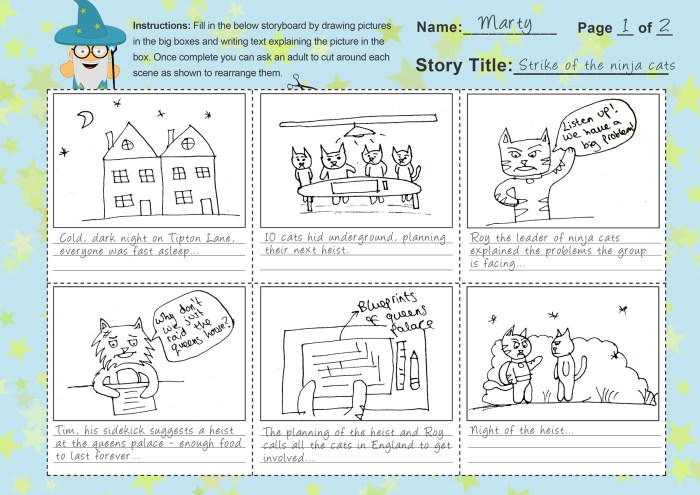
A storyboard is essentially a series of illustrated panels, each representing a shot or scene in your project. These panels work together to create a visual script, providing a roadmap for the final product. Each panel includes not only the visual representation but also crucial textual information.
Storyboard Components
The core components of a storyboard panel are the visual representation, descriptions, and annotations. The visual depicts the scene’s action, characters, and setting. The description provides a concise summary of what’s happening, including dialogue, sound effects, and camera movement. Annotations might include technical details such as camera angles (e.g., wide shot, close-up), lens type, or special effects. This combination of visual and textual information ensures a comprehensive understanding of each shot’s intent.
Storyboard Layouts and Applications
Different projects benefit from different storyboard layouts. A simple, single-panel layout might suffice for a short, straightforward scene. However, more complex scenes might require multiple panels to illustrate the action from various angles or perspectives. For instance, a car chase scene might use a sequence of panels showing the car from different angles—a wide shot to establish the location, a close-up on the driver’s face, and shots from inside the pursuing vehicle. Similarly, a complex animation scene might require a combination of panels illustrating character movements, background changes, and special effects. The choice of layout depends entirely on the complexity of the scene and the story’s requirements.
Best Practices for Clear and Concise Storyboard Panels
Creating effective storyboards relies on clarity and conciseness. Each panel should focus on a single, clear shot, avoiding unnecessary detail. Simple, easily understandable drawings are preferable to overly detailed illustrations. The descriptions should be brief but informative, capturing the essence of the scene without being overly wordy. Consistent use of annotations helps maintain a uniform and professional look.
Sample Storyboard Panel
Imagine a scene where a character, ANNA (a young woman with long brown hair, wearing jeans and a t-shirt), is sitting at a cafe table, looking anxiously at her phone. The panel would depict Anna from a medium shot, her face slightly illuminated by the phone’s screen. The description might read: “ANNA (MEDIUM SHOT) – anxiously checks her phone. SOUND: gentle cafe chatter. LIGHTING: soft, cafe lighting.” The annotation could indicate “MEDIUM SHOT, slightly low angle.” This simple panel effectively communicates the scene’s visual and narrative elements.
Comparison of Storyboard Software
Several software options are available for creating storyboards, each with its own strengths and weaknesses. Some popular choices include Storyboarder (open-source, user-friendly, great for quick sketching), Adobe Photoshop (powerful image editing capabilities, ideal for detailed illustrations), and Celtx (offers comprehensive project management features alongside storyboarding tools). Storyboarder excels in its simplicity and ease of use, making it ideal for beginners. Photoshop’s advanced features cater to professionals needing precise control over visuals, while Celtx’s broader functionalities make it a strong option for collaborative projects. The best choice depends on the user’s skill level, project requirements, and budget.
Building Confidence Through Practice and Experimentation

Storyboarding, like any skill, improves with consistent practice and a willingness to experiment. The more you storyboard, the more confident you’ll become in your ability to visually translate narratives. This section will guide you through a process for building that confidence, from initial concept to refined storyboard.
The key to mastering storyboarding lies in understanding that it’s an iterative process. It’s not about creating a perfect storyboard on the first try, but about continually refining your work based on your own critical eye and, importantly, feedback from others.
Creating a Storyboard from a Script or Concept
A systematic approach is crucial for effective storyboarding. Begin by thoroughly understanding your source material – whether it’s a script, a treatment, or a simple concept. Break down the narrative into individual scenes, identifying key actions and dialogue. Then, sketch out thumbnail-sized frames, focusing on composition and character placement. Gradually refine these thumbnails into more detailed sketches, adding elements like camera angles, lighting, and special effects. Finally, label each frame with concise descriptions of the action and dialogue. This methodical process helps build a strong visual foundation and prevents feeling overwhelmed.
Overcoming Creative Blocks When Storyboarding
Creative blocks are common, even for experienced storyboard artists. To overcome them, try changing your environment, taking a break, or brainstorming with others. Experiment with different sketching techniques or media – switching from pencil to digital tools, or vice-versa, can often spark new ideas. Consider exploring reference images to help visualize specific scenes or characters. Don’t be afraid to start over if necessary; sometimes a fresh approach is the best solution. Remember, the goal is to generate ideas, not to produce a perfect storyboard immediately.
Iterating and Refining a Storyboard Based on Feedback
Seeking feedback is an essential part of the storyboarding process. Share your work with peers, mentors, or colleagues and actively listen to their suggestions. Be open to criticism and use it to identify areas for improvement. Revise your storyboard based on the feedback received, paying attention to pacing, clarity, and overall effectiveness. This iterative process not only improves the quality of your storyboard but also helps you develop a thicker skin and greater confidence in handling constructive criticism.
Methods for Visualizing Complex Scenes
The following table compares different methods for effectively visualizing complex scenes in storyboards.
| Method | Description | Pros | Cons |
|---|---|---|---|
| Panel Expansion | Breaking down a complex scene into multiple smaller panels, each focusing on a specific action or detail. | Improved clarity, easier to follow complex actions. | Can become lengthy, requires more panels. |
| Multiple Panels, Single Action | Using multiple panels to show different viewpoints of a single action. | Offers varied perspectives, enhances impact. | Requires careful coordination between panels. |
| Annotated Sketches | Adding detailed notes and descriptions to clarify complex elements within a single panel. | Efficient for conveying information, less cluttered than multiple panels. | Relies heavily on text; can be difficult to interpret if not well-written. |
| Combination Approach | Utilizing a combination of the above methods depending on the scene’s complexity. | Offers flexibility and adaptability to various scenarios. | Requires a strong understanding of each method. |
The Importance of Regular Practice
Consistent practice is the most effective way to improve your storyboarding skills and build confidence. Regularly work on personal projects, participate in collaborative storyboarding exercises, or even simply practice sketching different scenes. The more you practice, the more fluent and confident you’ll become in your ability to translate ideas visually. Set aside dedicated time for practice, experiment with different styles and techniques, and don’t be afraid to make mistakes. Learning from your errors is a crucial part of the process.
Mastering Visual Storytelling and Communication
Effective visual storytelling in storyboarding goes beyond simply sketching out scenes; it’s about crafting a compelling narrative through imagery alone. A well-executed storyboard should communicate not just the action but also the emotion, tone, and pacing of your story, leaving a lasting impact on the viewer. This section explores key elements of visual storytelling and provides practical tips for creating impactful storyboards.
Visual storytelling in storyboarding hinges on the skillful use of visual elements to convey narrative information efficiently. The key lies in understanding how composition, character design, and visual cues contribute to the overall impact of the story. Different visual styles, from minimalist line drawings to detailed paintings, can significantly alter the perceived tone and atmosphere, making the choice of style crucial for effective communication.
Key Elements of Effective Visual Storytelling in Storyboards
Effective visual storytelling within a storyboard relies on several key components working in harmony. Clear character design helps viewers immediately understand the characters’ roles and personalities. Dynamic composition, utilizing techniques like rule of thirds and leading lines, guides the viewer’s eye and creates visual interest. Careful use of color palettes can evoke specific emotions and set the overall mood. Finally, the panel layout itself—the sequence and arrangement of images—dictates pacing and narrative flow. These elements, when skillfully combined, transform a series of drawings into a potent visual narrative.
Comparison of Different Visual Styles and Their Impact
Different visual styles dramatically impact the storytelling experience. A minimalist style, using simple lines and shapes, can convey a sense of starkness or urgency, often found in graphic novels or minimalist animation. Conversely, a highly detailed, realistic style can create a sense of immersion and realism, frequently used in feature film storyboarding. A cartoonish style can be used for comedic effect or to target a younger audience. The choice of style directly affects the audience’s emotional response and engagement. For instance, a horror film might benefit from a dark, shadowy style, while a children’s story might utilize bright, cheerful colors and simple character designs. The style chosen should always align with the tone and target audience of the story.
Tips for Creating Visually Engaging Storyboards
Creating visually compelling storyboards involves several key strategies. Firstly, prioritize clarity. Ensure that the action and characters are easily understood. Secondly, use strong composition techniques, such as the rule of thirds, to create visually interesting and balanced panels. Thirdly, employ a consistent visual style throughout the storyboard to maintain cohesion. Finally, don’t be afraid to experiment with different visual elements, such as color, perspective, and camera angles, to enhance the narrative. Remember, the goal is to communicate the story effectively through visuals alone.
Using Visual Cues to Enhance Narrative
Visual cues are powerful tools for enhancing narrative in storyboards. For instance, the use of light and shadow can create mood and atmosphere. A character’s body language and facial expressions can convey emotions and intentions without dialogue. Camera angles can establish power dynamics and perspectives. For example, a low-angle shot might make a character appear powerful, while a high-angle shot could make them seem vulnerable. Similarly, the use of color can subtly influence the audience’s perception; warm colors can suggest happiness and comfort, while cool colors might evoke sadness or fear. These subtle cues contribute significantly to the richness and depth of the story.
Storyboard Sequence Demonstrating a Dramatic Shift in Tone
The following sequence demonstrates a shift from peaceful serenity to sudden terror using only visual elements:
- Panel 1: Wide shot of a sun-drenched meadow, a lone figure peacefully sketching. Colors are warm and bright, with soft light and shadows. The figure is relaxed and their posture is calm.
- Panel 2: Close-up on the figure’s hand, still holding the pencil, but now slightly trembling. The colors become slightly muted, a hint of shadow creeps into the background.
- Panel 3: Medium shot, the figure looks up, their face now showing a flicker of fear. The sun is partially obscured by dark clouds. Shadows are more pronounced and the colors are darker, cooler tones.
- Panel 4: Extreme close-up on the figure’s wide, terrified eyes. The colors are almost entirely dark and desaturated, with only a stark contrast between the whites of their eyes and the darkness surrounding them. The background is now entirely dark and ominous.
Final Thoughts
Mastering storyboarding is a journey of practice and refinement. By understanding the fundamentals, embracing experimentation, and honing your visual storytelling skills, you’ll not only build confidence in your abilities but also unlock the power to communicate your ideas with clarity and impact. So grab your pencils (or digital stylus!), and start creating compelling visual narratives today.