Effectively storyboarding with a remote team presents unique challenges. This guide navigates the complexities of virtual collaboration, offering practical strategies and tools to streamline your workflow. From selecting the right online platform to mastering effective communication techniques, we’ll explore proven methods for achieving seamless collaboration and high-quality results, regardless of geographical limitations.
We’ll delve into specific tools and techniques, comparing popular options and highlighting best practices for feedback and communication. This comprehensive approach addresses potential roadblocks and provides solutions for a smooth, efficient, and ultimately successful remote storyboarding process. By the end, you’ll have the knowledge and resources to confidently lead your team through the entire storyboard creation process remotely.
Understanding Remote Storyboarding Workflow

Storyboarding remotely presents a unique set of challenges compared to traditional in-person collaboration. While the core process remains the same – visually planning a narrative – the lack of immediate face-to-face interaction necessitates a more structured and deliberate approach to communication and feedback. Successfully navigating this requires a clear understanding of the workflow and the adoption of suitable digital tools.
Effective remote storyboarding hinges on clear communication and the seamless integration of collaborative tools. Unlike in-person sessions, where spontaneous discussions and quick sketches are commonplace, remote work demands a more organized and pre-planned approach. This includes establishing clear communication channels, defining roles and responsibilities, and utilizing collaborative platforms designed for visual content sharing and feedback. Misunderstandings are more likely to occur without the visual cues and immediate clarifications possible in a face-to-face setting.
Setting Up a Shared Online Storyboarding Platform
Establishing a shared online platform is crucial for efficient remote storyboarding. The chosen platform should allow for real-time collaboration, version control, and easy feedback integration. A step-by-step guide for setup could involve: First, select a suitable platform based on your team’s needs and budget (consider options like Miro, Mural, or even Google Slides with its collaborative features). Second, create a project workspace within the platform, inviting all team members and assigning appropriate permissions. Third, establish a clear naming convention for files and folders to maintain organization. Fourth, define a workflow for creating, reviewing, and approving storyboards, including the process for submitting changes and resolving feedback. Finally, schedule regular check-in meetings to review progress and address any roadblocks.
Best Practices for Communication and Feedback During Remote Storyboarding
Effective communication is paramount to a successful remote storyboarding process. Regular and structured communication prevents misunderstandings and ensures everyone is on the same page. This includes using clear and concise language in all communications, providing detailed explanations for any design choices, and actively soliciting feedback from all team members. The feedback process itself should be constructive and specific, focusing on actionable improvements rather than general criticism. Utilizing features within the chosen platform, such as commenting tools and annotation features, can significantly enhance feedback efficiency and clarity.
Sample Communication Plan for a Remote Storyboarding Project
A well-defined communication plan is vital for successful remote collaboration. This plan should specify the communication tools, frequency of communication, and responsible parties. For example, a team could use a project management tool like Asana or Trello to track progress and deadlines. Daily stand-up meetings (via video conferencing) could provide brief updates and address immediate concerns. A dedicated Slack channel or similar instant messaging platform could facilitate quick questions and informal discussions. Weekly review meetings (via video conferencing) would allow for more in-depth feedback sessions on the storyboards’ progress. Finally, formal feedback should be provided via comments directly on the storyboard within the chosen platform, with a designated deadline for responses. This multi-faceted approach ensures both quick communication and more formal, considered feedback sessions.
Effective Tools and Techniques for Remote Storyboarding
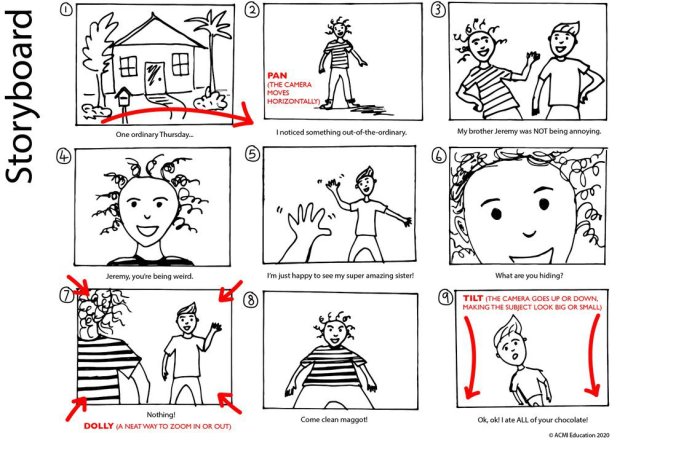
Streamlining the storyboard creation process for remote teams requires careful selection of tools and techniques that foster collaboration and clear communication. Effective remote storyboarding hinges on choosing the right software, establishing clear communication channels, and utilizing file formats that ensure visual fidelity across different platforms. This section will explore several key aspects to achieve this.
Comparison of Online Storyboarding Tools
Three popular online storyboarding tools offer distinct features and cater to varying needs. Consider these strengths and weaknesses when selecting a platform for your team.
| Tool | Features | Limitations | Best Suited For |
|---|---|---|---|
| Storyboarder | Free, open-source, simple interface, easy to learn, supports various export formats. | Limited collaboration features compared to paid options; less advanced features. | Individuals and small teams seeking a simple, free option. |
| Miro | Robust collaboration features, real-time editing, extensive template library, integration with other tools. | Can be overwhelming for beginners, pricing can be significant for large teams. | Large teams needing robust collaboration and extensive features. |
| Adobe Photoshop/Illustrator (with cloud collaboration) | Industry-standard tools, precise control over visuals, powerful editing capabilities, cloud features enable collaboration. | Steep learning curve, expensive subscription, file size can be large. | Teams requiring professional-grade visuals and precise control, familiar with Adobe products. |
Utilizing Screen Recording Software for Feedback
Screen recording software provides a powerful method for delivering visual feedback on storyboards. By recording a walkthrough of the storyboard, highlighting key elements and providing commentary, team members can quickly understand the intended narrative and identify areas for improvement. Tools like Loom, OBS Studio, or QuickTime Player allow for easy recording and sharing of these walkthroughs. This method significantly enhances communication compared to relying solely on written comments.
File Formats for Remote Storyboard Sharing
Choosing the right file format is crucial for ensuring compatibility and maintaining visual quality during remote collaboration.
| Format | Advantages | Disadvantages | Best Use Case |
|---|---|---|---|
| Widely compatible, preserves formatting, relatively small file size. | Difficult to edit, limited annotation capabilities. | Final review and distribution. | |
| PNG | Lossless compression, high image quality. | Larger file size compared to JPEG, less suitable for animation sequences. | Sharing individual storyboard panels with high fidelity. |
| JPEG | Smaller file size compared to PNG, widely compatible. | Lossy compression, can result in reduced image quality. | Sharing individual storyboard panels where some quality loss is acceptable. |
| PSD (Photoshop) | Preserves layers and edits, allows for easy collaboration within Photoshop. | Requires Photoshop to open, large file sizes. | Collaborative editing within a team using Photoshop. |
Collaborative Whiteboarding for Brainstorming
Collaborative online whiteboards, such as Miro or Mural, facilitate remote brainstorming and initial storyboard sketching. Team members can simultaneously contribute ideas, sketch rough layouts, and annotate on a shared canvas. This interactive process fosters creative input from all participants, leading to more robust and cohesive storyboards. The ability to easily organize and rearrange elements on the whiteboard ensures a dynamic and efficient brainstorming session. For instance, a team working on an animated short could use a whiteboard to sketch out key scenes, character designs, and camera angles before moving to a more detailed storyboarding tool.
Optimizing Collaboration and Feedback in Remote Storyboarding
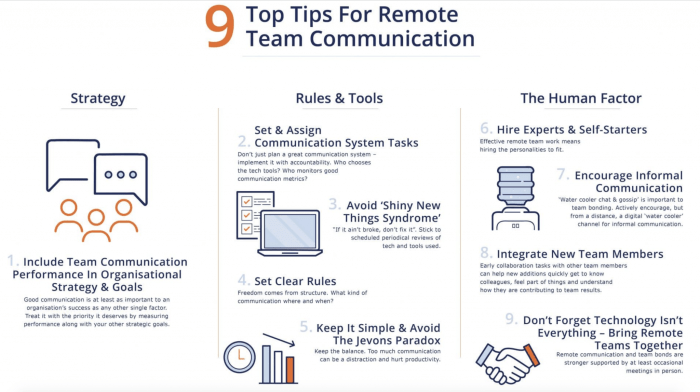
Effective remote storyboarding hinges on seamless communication and efficient feedback loops. Clear communication protocols and well-structured virtual meetings are crucial for maintaining project momentum and ensuring everyone is on the same page, regardless of geographical location. This section details strategies for optimizing collaboration and feedback during the remote storyboarding process.
Successful remote storyboarding relies heavily on proactive communication strategies and well-defined workflows. Utilizing the right tools and establishing clear expectations from the outset significantly impacts the efficiency and quality of the final product. By implementing the techniques discussed below, teams can mitigate common challenges associated with remote collaboration and foster a productive environment.
Strategies for Clear and Consistent Communication
Maintaining clear and consistent communication during remote storyboarding requires a multifaceted approach. This includes establishing a central communication hub, utilizing visual aids effectively, and promoting regular check-ins. The use of project management software with integrated communication tools is highly recommended.
For instance, using a platform like Slack or Microsoft Teams allows for real-time updates, quick questions, and the sharing of files. Regularly scheduled video calls can replace in-person meetings and provide a more engaging platform for collaboration and feedback.
Sample Agenda for a Virtual Storyboarding Meeting
A well-structured agenda is vital for productive virtual meetings. Allocating specific time slots for each stage ensures the meeting remains focused and on schedule. Below is a sample agenda for a 60-minute virtual storyboarding meeting:
| Time | Activity |
|---|---|
| 0-10 mins | Review of previous work/updates |
| 10-25 mins | Brainstorming and ideation (using a shared whiteboard tool) |
| 25-40 mins | Storyboard creation and refinement |
| 40-50 mins | Feedback and discussion |
| 50-60 mins | Action item assignment and next steps |
Providing Constructive Feedback with Visual Annotations
Providing effective feedback on storyboards remotely requires utilizing visual tools. Simple tools like online annotation software (e.g., Adobe Acrobat, Figma) allow for direct feedback on the storyboard itself. This avoids ambiguity and ensures clarity. For example, a team member can directly circle a scene needing improvement and add a text box with suggestions for changes.
The feedback should be specific and actionable. Instead of saying “This scene is boring,” a more constructive comment would be, “This scene feels slow. Consider adding a visual element or a change in camera angle to increase the pace.”
Potential Roadblocks and Solutions in Remote Storyboarding
Remote storyboarding, while offering flexibility, presents unique challenges. Addressing these potential roadblocks proactively is essential for project success.
| Roadblock | Solution |
|---|---|
| Time zone differences | Schedule meetings at times convenient for the majority of the team, or utilize asynchronous communication tools. |
| Technical difficulties | Ensure all team members have reliable internet access and the necessary software. Provide detailed instructions and technical support if needed. |
| Lack of real-time collaboration | Utilize collaborative online whiteboard tools that allow simultaneous editing and feedback. |
| Difficulties in conveying non-verbal cues | Encourage the use of video conferencing to facilitate better communication and understanding. |
| Inconsistent feedback | Establish clear feedback guidelines and use a structured feedback process. |
Conclusion

Mastering remote storyboarding requires a blend of strategic planning, effective communication, and the right technological tools. By implementing the tips and techniques Artikeld in this guide, you can overcome the challenges of distance and foster a collaborative environment that yields impactful storyboards. Remember, clear communication, the right platform, and consistent feedback are key to success in this increasingly common workflow. Embrace the opportunities of remote collaboration and elevate your storyboarding process to new heights.