Mastering visual storytelling can seem daunting, but with the right guidance, even beginners can create compelling storyboards. This guide provides a structured seven-day plan, transforming your initial ideas into dynamic visual narratives. We’ll explore fundamental concepts, practical techniques, and essential software, equipping you with the skills to confidently translate scripts and concepts into engaging storyboards.
From understanding basic storyboard components like panels and dialogue to mastering advanced techniques such as camera angles and visual cues for conveying emotion, this guide offers a comprehensive approach. We’ll cover both traditional and digital methods, ensuring you find the perfect workflow for your style and project needs. By the end, you’ll possess the confidence to effectively present your work and receive constructive feedback.
Understanding Storyboard Fundamentals
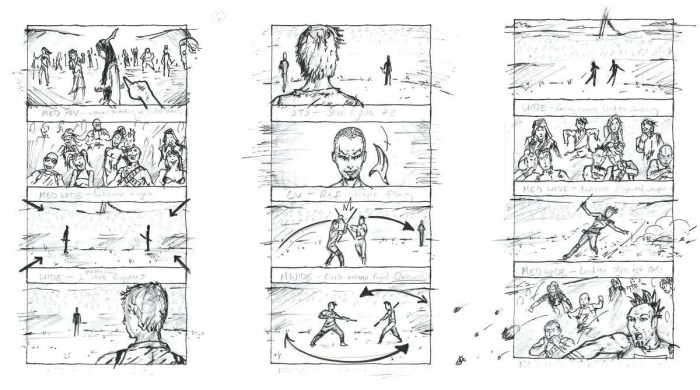
Storyboarding is a crucial pre-production step in filmmaking, animation, and other visual media. It’s a visual roadmap that helps bring your creative vision to life, allowing you to plan shots, transitions, and character movements before committing to the actual production process. Understanding the fundamental components of a storyboard is essential for effective visual storytelling.
Storyboards consist of several key elements working in concert to create a cohesive narrative. These elements work together to communicate the visual and narrative aspects of a scene.
Storyboard Components
A storyboard panel typically includes a visual representation of the scene (a drawing or sketch), a description of the action, any dialogue spoken by characters, and details about the scene’s setting, including lighting, camera angles, and overall mood. The visual representation is usually a simple drawing, focusing on key action and character placement. The description adds context and clarifies any ambiguities in the drawing. Dialogue helps convey the characters’ emotions and intentions, while the scene setting provides essential visual information to the director and crew. For instance, a panel might show two characters talking, with a description noting “CLOSE UP on ANNA’s worried face,” dialogue indicating “Anna: I don’t think this is safe,” and a scene setting describing “Dark, stormy night. Rain lashes against the windows.”
Storyboard Styles and Applications
Different projects require different storyboard styles. For instance, a highly detailed, almost photorealistic style might be used for a live-action film aiming for a specific aesthetic, while a simpler, more schematic style might suffice for a low-budget animation project. Some common styles include:
* Photorealistic: These storyboards look like detailed photographs, providing a precise representation of the planned shots. They are often used in high-budget productions where visual accuracy is paramount.
* Schematic: These storyboards use simple shapes and lines to represent characters and settings, focusing on the composition and movement of the scene. They are frequently used in animation or projects with limited budgets.
* Comic-Style: These storyboards resemble comic book panels, often incorporating speech bubbles and sound effects. They can be expressive and visually engaging.
* Rough Sketches: These storyboards consist of quick, loose sketches that capture the essence of the scene. They are often used in the early stages of planning to quickly visualize ideas.
Choosing the Right Storyboard Format
The best storyboard format depends heavily on the project’s scope, budget, and style. Consider these factors:
* Project Complexity: Complex projects with intricate visual effects or extensive character interactions might benefit from more detailed storyboards. Simpler projects might only require basic sketches.
* Budget and Time Constraints: Detailed storyboards can be time-consuming and expensive to create. Projects with limited resources may need to use simpler styles.
* Target Audience: The style of the storyboard should align with the target audience and the overall tone of the project.
Sample Storyboard Panel
Let’s imagine a scene where two friends, Alice and Bob, are sitting on a park bench. Alice is holding a letter, looking upset. Bob puts a comforting hand on her shoulder.
(Panel Drawing Description): A simple drawing shows Alice and Bob sitting on a park bench. Alice is shown with a downturned face, holding a letter. Bob’s hand rests gently on her shoulder. The background depicts a simple park setting with trees and a pathway.
(Panel Description): MEDIUM SHOT. Alice looks distraught, tears welling up. Bob looks concerned.
(Dialogue): Alice: “I… I don’t know what to do.” Bob: “Hey, it’s okay. We’ll figure it out together.”
(Scene Setting): Sunny afternoon in a quiet park. Gentle breeze rustling leaves.
Storyboard Software Comparison
Choosing the right software can significantly improve your workflow. Here’s a comparison of some popular options:
| Software | Key Features | Ease of Use | Cost |
|---|---|---|---|
| Storyboarder | Free, open-source, collaborative features | Beginner-friendly | Free |
| Adobe Photoshop | Powerful image editing, versatile | Steeper learning curve | Subscription-based |
| Celtx | Integrated screenwriting and storyboarding | User-friendly interface | Freemium model |
| PowerPoint | Widely accessible, simple for basic storyboards | Easy to learn | Widely available, often included with Microsoft Office |
Developing Your Story and Visuals
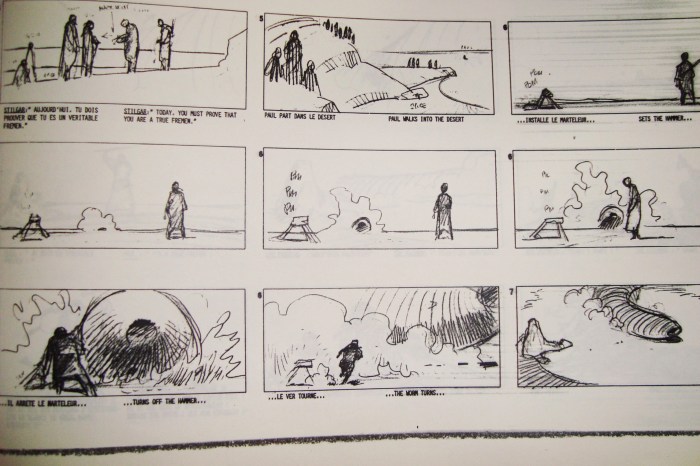
Transforming a script or a nascent idea into a compelling visual storyboard requires a methodical approach. This involves not only understanding the narrative arc but also translating it into a series of dynamic images that effectively communicate the story’s emotion, pacing, and overall impact. This process bridges the gap between abstract storytelling and concrete visual representation.
The journey from script to storyboard begins with a thorough understanding of your narrative. Break down the script into individual scenes, focusing on key moments and emotional beats. Then, visualize these moments as individual frames, considering camera angles, character positioning, and the overall composition of each shot. Think about how you can use visual elements to enhance the story, adding layers of meaning beyond the dialogue. Remember, a well-executed storyboard is not just a visual roadmap; it’s a powerful storytelling tool in its own right.
Character Design and Layout
Compelling character designs are crucial for establishing visual identity and conveying personality. Consider factors like physical appearance, clothing, posture, and even the use of color to communicate character traits and emotional states. For example, a character dressed in sharp, formal attire might convey authority, while a character in tattered clothing might suggest hardship or vulnerability. Similarly, a character’s posture—hunched over versus standing tall—can communicate their emotional state. Effective layouts, on the other hand, involve careful consideration of composition, character placement, and the use of foreground and background elements to guide the viewer’s eye and create a sense of depth and space. A well-designed layout enhances the overall visual appeal and narrative impact of your storyboard.
Storyboard Sequence: Rising Action and Climax
Let’s illustrate a simple scene depicting a rising action and climax. Imagine a scene where a lone hiker is confronted by a bear in a dense forest.
Panel 1: Wide shot of the hiker walking along a forest path, sunlight dappling through the trees. The hiker appears relaxed and enjoying the scenery. The overall tone is peaceful.
Panel 2: Medium shot, the hiker stops, hearing a sound. A sense of unease is introduced through their body language – perhaps a slight turn of the head, a hand reaching for a walking stick.
Panel 3: Close-up on the hiker’s face, eyes widening in alarm as they spot the bear in the distance. Fear is clearly depicted in their expression.
Panel 4: Medium shot, the bear emerges from the trees, growling, creating a sense of imminent danger. The hiker’s stance changes to a defensive posture.
Panel 5: Close-up on the hiker’s hand, clutching the walking stick tightly. This emphasizes the hiker’s fear and the potential for conflict.
Panel 6: Wide shot, the bear charges towards the hiker, the climax of the scene. The visual focus is on the bear’s movement and the hiker’s vulnerability.
Using Visual Cues to Convey Emotion and Atmosphere
Visual cues are essential for enhancing the emotional impact and establishing the atmosphere of your storyboard. Color palettes play a significant role. Warm colors like oranges and reds can evoke feelings of warmth, excitement, or danger, while cool colors like blues and greens can create a sense of calm or melancholy. Lighting is another crucial element. High-key lighting can suggest happiness or innocence, while low-key lighting can create a sense of mystery or suspense. The use of shadows can also add depth and intrigue, hinting at hidden dangers or unspoken emotions. Furthermore, the choice of setting and the details within that setting contribute significantly to the overall atmosphere. A dark, stormy night creates a very different atmosphere than a bright, sunny day.
Camera Angles and Their Impact
Different camera angles can significantly impact the storytelling within a storyboard. A low-angle shot, for instance, can make a character appear powerful or intimidating, while a high-angle shot can make them seem vulnerable or insignificant. An eye-level shot creates a sense of intimacy and connection with the character. A close-up shot emphasizes emotion and detail, while a long shot establishes setting and context. The strategic use of these angles enhances the narrative flow and creates a more engaging viewing experience. For example, a low angle shot during a confrontation can emphasize the dominance of one character over another.
Practical Application and Refinement
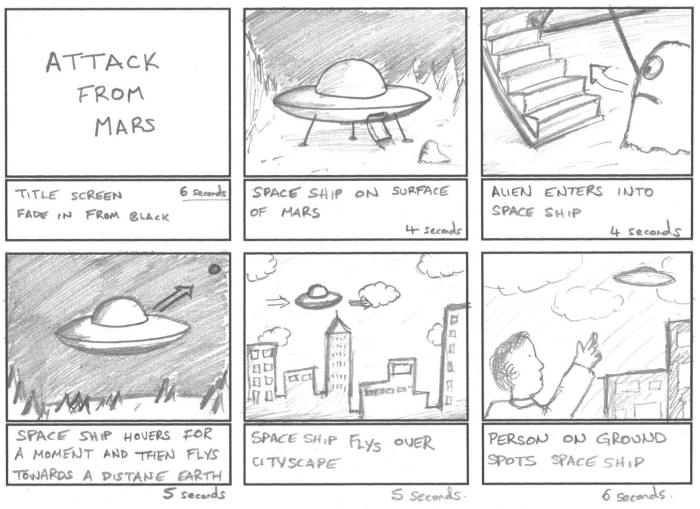
Storyboarding is a practical skill; mastering it involves understanding common pitfalls and employing effective techniques. This section focuses on refining your storyboard creation process through practical application, feedback, and efficient presentation methods. We will explore both digital and traditional approaches, highlighting their advantages and disadvantages.
This section delves into the practical aspects of storyboard creation, addressing common beginner mistakes, comparing different creation methods, emphasizing the role of feedback and revision, and providing guidance on effective presentation. A sample storyboard will illustrate the application of these principles.
Common Beginner Mistakes and Solutions
Beginners often struggle with several key areas. One common mistake is neglecting the pacing of the story. A storyboard with too many panels depicting static scenes can feel slow and monotonous, while a storyboard with too few panels can feel rushed and difficult to follow. Another frequent error is inconsistent visual style; a storyboard should maintain a cohesive visual language throughout. Finally, a lack of clarity in the visuals themselves – unclear character expressions, ambiguous settings, or poorly defined action – can hinder understanding. To address these issues, beginners should carefully plan their scene pacing, establish a consistent visual style guide before starting, and prioritize clarity in their drawings, ensuring each panel conveys a clear and concise piece of information. Careful planning and consistent revision are crucial.
Digital vs. Traditional Storyboarding Methods
Digital storyboarding, using software like Storyboard Pro or Photoshop, offers advantages such as easy revision, seamless integration with other digital workflows, and the ability to easily share and collaborate. However, it can be more time-consuming to learn the software, and the digital medium might lack the tactile feel some artists prefer. Traditional storyboarding, using pencil and paper, allows for quick sketching and experimentation, fostering a more spontaneous creative process. However, revisions are more cumbersome, and scanning and editing the boards for digital sharing can be an additional step. The choice between digital and traditional methods often depends on personal preference, project requirements, and available resources. A hybrid approach, using sketches for initial brainstorming and then digitizing for final presentation, is also a viable option.
The Importance of Feedback and Revision
Feedback is essential for refining a storyboard. Constructive criticism from peers, mentors, or potential collaborators can identify areas for improvement in pacing, clarity, visual storytelling, and overall narrative flow. Revision is not just about correcting mistakes; it’s an iterative process of refinement, allowing you to enhance the visual storytelling and ensure the storyboard effectively communicates the intended story. Actively seeking and incorporating feedback is crucial for improving your skills and producing a high-quality storyboard.
Tips for Presenting Your Storyboard
Presenting your storyboard effectively involves more than just showing the images. Prepare a concise overview of the story and its key elements. Clearly articulate your creative choices and design decisions. Use clear and concise language, and be prepared to answer questions about your visual choices and narrative intentions. Consider using annotations to further clarify the action or dialogue within each panel. A well-organized and visually appealing presentation will significantly enhance the impact of your work.
Example Storyboard: A Short Film Scene
This scene depicts a tense confrontation in a dimly lit alleyway.
- Panel 1: Wide shot – Two figures silhouetted against a flickering neon sign. Rain slicks the alley floor.
- Panel 2: Medium shot – One figure (a woman) steps closer, her face partially obscured by shadow. She holds a small, metallic object.
- Panel 3: Close-up – The other figure (a man) shows a nervous expression, his hand subtly reaching towards his pocket.
- Panel 4: Medium shot – The woman speaks, her lips barely moving. A speech bubble shows a single word: “Money.”
- Panel 5: Close-up – The man hesitates, his eyes darting around nervously.
- Panel 6: Medium shot – The man slowly reaches into his pocket, pulling out a wad of cash.
- Panel 7: Wide shot – The woman takes the money, and quickly turns and disappears into the darkness, leaving the man alone in the rain.
This storyboard focuses on building tension through a series of carefully chosen shots and pacing, creating a sense of unease and suspense. The use of shadow and light enhances the mood, while the limited dialogue emphasizes the visual storytelling.
Outcome Summary
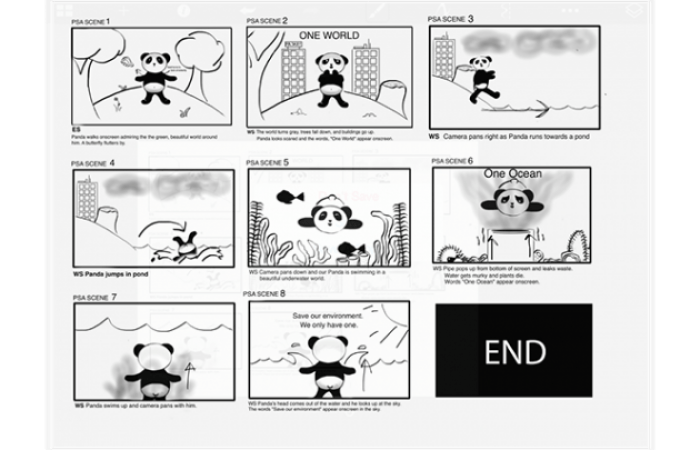
Creating effective storyboards is a crucial skill for any visual storyteller. This seven-day journey has equipped you with the foundational knowledge and practical techniques to transform your ideas into captivating visual narratives. Remember, consistent practice and iterative refinement are key. Embrace the creative process, experiment with different styles, and most importantly, tell your stories with confidence and passion. The power of visual storytelling is now within your grasp.