Storyboarding, a visual roadmap for filmmakers and animators, transforms abstract ideas into concrete sequences. Mastering its core vocabulary is crucial for effective communication and collaboration. This exploration delves into essential storyboarding terms, clarifying common misconceptions and equipping you with the language to navigate the creative process with confidence.
From understanding the difference between a shot and a scene to mastering camera angles and annotations, this guide provides a foundational understanding of storyboarding techniques used across animation and live-action filmmaking. We’ll examine how storyboards facilitate pre-visualization, ensuring smooth production workflows and a clear vision for the final product. We’ll also touch on the practical aspects, including software choices and collaborative strategies.
Core Storyboarding Terms Explained
Storyboarding is a visual language used to plan films, animations, and other visual media. Understanding key terms is crucial for effective communication and collaboration throughout the production process. This section will clarify some fundamental concepts, providing a solid base for understanding and creating effective storyboards.
Shot vs. Scene in Storyboarding
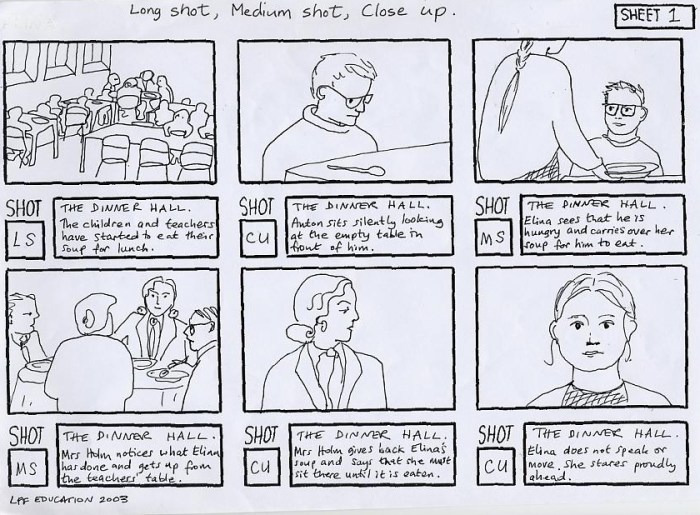
A shot and a scene are distinct yet related concepts in storyboarding. A shot refers to a single, unbroken sequence of film or video recorded from a particular camera angle. It’s the fundamental building block of a film. A scene, on the other hand, comprises one or more shots that take place in a single location and time period, typically with a continuous narrative flow. Think of it this way: a scene is a larger chunk of the story, while a shot is a specific visual component within that scene. For example, a scene might depict a conversation in a coffee shop, which could be composed of multiple shots – a wide shot establishing the setting, a close-up on one character’s emotional reaction, and a medium shot showing both characters interacting.
Panel Representation in Storyboards
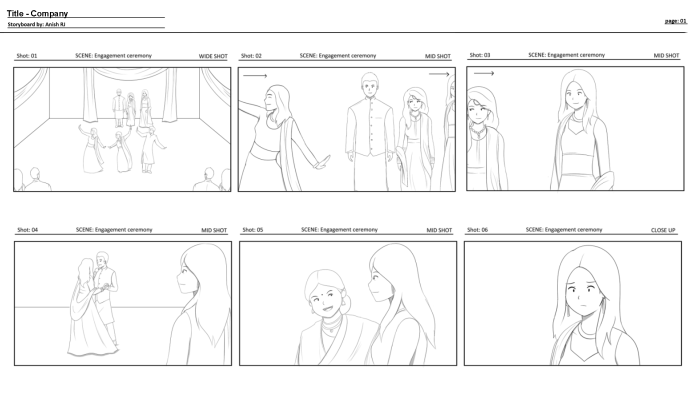
Each panel in a storyboard represents a single shot. It’s a visual representation of what the audience will see on screen, including the camera angle, character positioning, and key action. Panels are typically rectangular, mimicking the aspect ratio of the final film or video. Beyond the visual depiction, panels often include annotations such as camera directions (e.g., “CLOSE UP,” “WIDE SHOT”), character descriptions, dialogue, and sound effects. This comprehensive information makes panels invaluable for planning and understanding the visual flow of a story.
Depiction of Camera Angles in Storyboards
Camera angles are crucial for conveying emotion, perspective, and power dynamics. Storyboards use visual cues to represent these angles. A high-angle shot, for instance, might be depicted with the character drawn smaller than the background elements, creating a sense of vulnerability or insignificance. Conversely, a low-angle shot would portray the character larger than their surroundings, suggesting dominance or power. A straight-on, eye-level shot is represented by a more neutral positioning of the character within the panel. These visual cues, combined with annotations, ensure everyone understands the intended visual impact of each shot.
Importance of Clear and Concise Annotations
Annotations are essential for providing additional context and instructions that go beyond the visual representation in the panel. Clear and concise annotations help the director, animators, and other crew members understand the intended mood, action, dialogue, and sound effects for each shot. Ambiguous annotations can lead to misinterpretations and inconsistencies, resulting in a less effective final product. Using standardized abbreviations and consistent formatting enhances readability and clarity, improving the overall efficiency of the production process.
Storyboard Panel Illustrating a Character’s Emotional Reaction
Imagine a panel depicting a character receiving unexpected bad news. The character is shown from a slightly low angle, making them appear slightly larger and more imposing, despite their slumped posture. Their face is partially obscured by their hands, which are covering their mouth. Their shoulders are slumped, and their body is slightly turned away from the viewer. The background is blurred and muted in color, focusing attention on the character’s emotional state. The annotation might read: “CLOSE UP – Character devastated by news. Sound: Soft sob.” This combination of visual cues and annotation effectively communicates the character’s emotional turmoil without the need for explicit dialogue or detailed descriptions.
Advanced Storyboarding Techniques
Storyboarding transcends basic visual planning; it’s a powerful tool for pre-visualization, communication, and refining the narrative flow across various mediums. Mastering advanced techniques unlocks a deeper understanding of pacing, character development, and overall cinematic impact.
Storyboarding in animation and live-action filmmaking share the fundamental goal of visualizing a sequence, but their approaches differ significantly. The differences stem from the inherent nature of each medium: the flexibility of animation versus the constraints of live-action shooting.
Storyboarding in Animation versus Live-Action Filmmaking
Animation storyboards often serve as the primary blueprint for the entire production. Animators directly reference the storyboard panels, using them as a guide for character movement, camera angles, and scene composition. The level of detail can be extensive, including notes on character expressions, timing, and even specific animation techniques. Live-action storyboards, conversely, act more as a pre-visualization tool, helping to plan shots, camera movements, and blocking of actors. While detailed, they’re less likely to dictate every minute aspect of the final product, allowing for greater on-set improvisation and adjustments based on the actors’ performances and available resources. The flexibility of a live-action shoot allows for more spontaneity, whereas animation relies more heavily on the initial storyboard’s precision.
Storyboarding for Pre-visualization of Complex Sequences
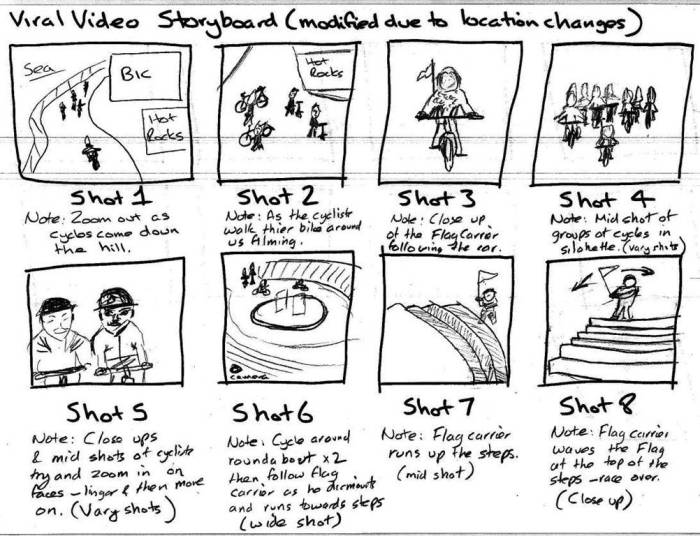
For complex sequences, such as action scenes or elaborate special effects shots, storyboarding becomes an invaluable pre-visualization tool. It allows filmmakers to plan intricate camera movements, choreograph action sequences, and visualize the integration of visual effects before any filming or animation begins. By breaking down complex sequences into a series of manageable panels, storyboards help identify potential logistical challenges, refine the visual flow, and ensure the sequence is both visually engaging and narratively coherent. For example, a complex car chase scene could be broken down into panels showing the car’s trajectory, the placement of obstacles, and the camera’s perspective at each point, ensuring a smooth and exciting sequence in the final product. This detailed pre-planning saves time and resources during the actual production.
Creating a Storyboard from a Script
Transforming a script into a storyboard involves a careful analysis of the script’s action, dialogue, and character interactions. Key considerations include identifying the crucial moments to be depicted visually, selecting appropriate camera angles to convey emotion and perspective, and determining the pacing and rhythm of the sequence. The storyboard artist must translate the written word into a visual language, paying attention to character expressions, body language, and the overall mood of each scene. They might initially create rough sketches to capture the essence of each scene before refining them into polished panels. Collaboration with the director is crucial at this stage to ensure the storyboard accurately reflects their vision.
Storyboarding a Simple Narrative Arc
The following series of storyboard panels demonstrates a simple narrative arc:
Panel 1 (Setup): A young woman sits alone in a coffee shop, looking pensive. The setting is peaceful, with soft lighting and muted colors.
Panel 2 (Conflict): A man approaches her table, spilling coffee on her laptop. The scene shifts to more dynamic angles and lighting. The woman’s expression shows annoyance.
Panel 3 (Resolution): The man profusely apologizes, offering to buy her a new laptop. The woman smiles slightly, accepting his apology. The lighting returns to a softer mood. The panel focuses on a close-up of their reconciled expressions.
Conveying Pacing and Rhythm Through Storyboard Composition and Transitions
Pacing and rhythm are effectively conveyed through panel composition and transitions. Wide shots can establish setting and context, while close-ups emphasize emotion and detail. Fast-paced sequences might utilize smaller panels and quick transitions, whereas slower, more contemplative scenes can use larger panels with longer pauses between them. The use of different camera angles and movements also contributes to the overall pacing and rhythm. For instance, a series of quick cuts from different angles could create a sense of urgency and chaos, while a slow zoom into a character’s face could emphasize their internal struggle.
Storyboard Software and Workflow
Creating effective storyboards involves more than just sketching; selecting the right software and establishing a robust workflow are crucial for efficient collaboration and iterative refinement. The choice of software depends on individual preferences, project needs, and team expertise. A well-defined workflow ensures that feedback is integrated effectively and the final storyboard accurately reflects the vision.
Storyboard Software Options
Three popular storyboard software options are Storyboarder, Adobe Photoshop, and Celtx. Storyboarder is a free, open-source application specifically designed for creating storyboards, offering a streamlined interface focused on ease of use and intuitive navigation. Adobe Photoshop, a widely used industry-standard image editing software, provides unparalleled flexibility and control over image manipulation, but requires a subscription and a steeper learning curve. Celtx, a more comprehensive production management tool, incorporates storyboarding features alongside scriptwriting, scheduling, and budgeting capabilities, offering a complete solution for larger projects. Each program offers distinct advantages and disadvantages depending on the user’s skill level and project requirements.
Utilizing Layers in Storyboard Software
Effective use of layers is paramount for organizing storyboard elements. Different layers can be dedicated to backgrounds, characters, props, and annotations. For example, a background layer might contain the setting, a character layer would hold the character poses, and a prop layer would include objects like furniture or tools. This layered approach allows for easy manipulation and modification of individual elements without affecting others. Changes to one layer won’t unintentionally alter elements on another, streamlining the revision process and preventing accidental deletions or edits. Annotations can be added on a separate layer to provide director’s notes or comments without cluttering the visual elements.
Collaborating on Storyboards Digitally
Digital collaboration tools significantly enhance teamwork in storyboard creation. Cloud-based platforms like Google Drive or Dropbox allow for shared access and real-time co-editing. Version control systems track changes, enabling team members to review past iterations and understand the evolution of the storyboard. Using annotation tools within the software or adding comments directly to the files facilitate efficient feedback and discussion. Regular check-ins and clearly defined roles and responsibilities ensure everyone is aligned and contributing effectively. For instance, one team member might focus on the layout, another on character design, and a third on adding dialogue and annotations.
Revising and Iterating on Storyboards
A robust revision process is crucial for refining storyboards. Feedback should be gathered from stakeholders, including directors, producers, and writers. This feedback should be systematically addressed, with changes tracked and documented. Revisions should be made iteratively, with each round of changes building upon the previous version. Clear communication and consistent updates are key to ensuring everyone is informed of the progress and that the storyboard reflects the collective vision. Using version control allows for easy comparison between iterations, enabling team members to understand the reasoning behind specific changes.
Digital vs. Traditional Storyboarding
| Feature | Digital Storyboarding | Traditional Storyboarding |
|---|---|---|
| Ease of Revision | High: Easy to make changes, duplicate elements, and experiment with different layouts. | Low: Corrections require redrawing, making revisions time-consuming and potentially messy. |
| Collaboration | High: Cloud-based platforms enable easy sharing and real-time collaboration. | Low: Requires physical sharing of storyboards, making collaboration less efficient. |
| Cost | Moderate to High: Requires software purchase or subscription. | Low: Primarily requires paper, pencils, and other inexpensive art supplies. |
| Distribution | High: Easy to share electronically via email, cloud storage, or presentation software. | Low: Requires physical copies for sharing, limiting accessibility. |
Closing Summary
Storyboarding is more than just drawing pictures; it’s a powerful tool for visualizing narratives, ensuring consistent pacing, and streamlining the filmmaking process. By understanding the key terms and techniques discussed here, you’ll be better equipped to communicate your creative vision, collaborate effectively with your team, and ultimately, bring your stories to life. The journey from script to screen is significantly smoother when guided by a well-crafted storyboard, ensuring both artistic integrity and efficient production.